
Build a Microsoft IQ knowledge layer in Foundry IQ
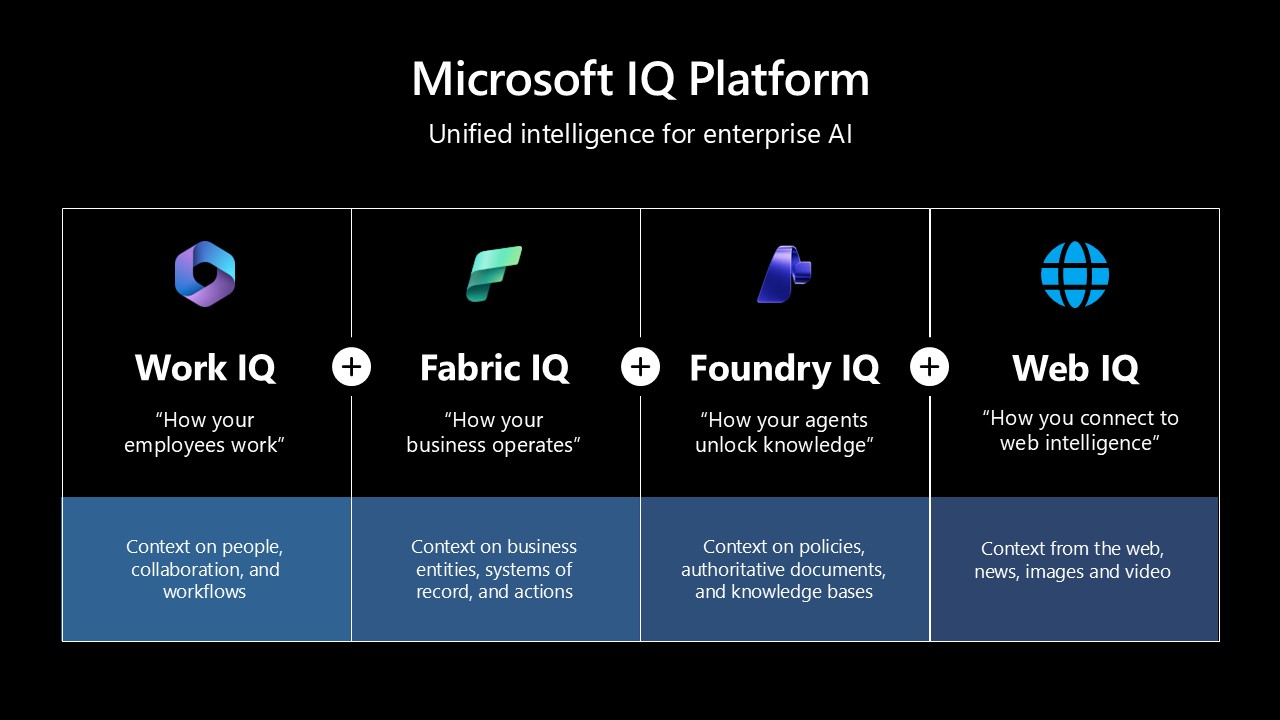
Microsoft IQ is a family of knowledge layers that give AI agents the context they need to act with judgment. Each IQ grounds a different slice of reality:
| Microsoft IQ | What it grounds on |
|---|---|
| Work IQ | The live understanding of how your people work — mail, chats, files, and meetings across Microsoft 365. |
| Fabric IQ | The live state of your business as a semantic ontology in Microsoft Fabric — here, an airline ontology (flights, routes, aircraft, crews). |
| Web IQ | Fresh, real-world intelligence from the open web — web, news, videos, and browse. |
| Foundry IQ | The federation layer. It curates the other IQs into one Knowledge Base and grounds any agent. |
Foundry IQ is the layer you build here. It is built on Azure AI Search's information-retrieval ranking and agentic-retrieval pipelines: a Knowledge Base (KB) fans a single natural-language question out across many Knowledge Sources (KS), then plans, retrieves, reranks, and synthesizes a cited answer. Wire Work IQ, Fabric IQ, and Web IQ in as three federated sources and you get one knowledge layer that grounds any agent with work, business, and web knowledge at once.
The arc of this recipe: three Microsoft IQ sources → one Foundry IQ Knowledge Base → a query that proves each IQ answers, plus a cross-source query that joins them. We stop at retrieval — the closing section shows how to point any agent at the resulting MCP endpoint.
Preview status & region. These federated KS types (Work IQ, Fabric ontology, Web IQ via MCP) are preview on the
2026-05-01-previewSearch API. Your Search service must live in a preview region — this recipe was authored against West Central US. GA timing and region coverage change; check What's new first.
Note on running this notebook. Every section degrades gracefully: any IQ whose credential/entitlement is missing prints a
[skipped]line and the rest still runs top-to-bottom. Cells ship with outputs cleared — they call live Azure / Foundry / Microsoft Grounding endpoints, so run them against your own resources.
1 · Prerequisites
Each Microsoft IQ has its own access path. Foundry IQ (the KB) only needs an Azure AI Search service + a chat model; the three IQs you federate in have the gates below.
| Requirement | Notes |
|---|---|
| Azure AI Search service (Foundry IQ) | In a region that provides agentic retrieval (e.g. West Central US). Use Search Service Contributor (keyless, recommended) or an admin key. |
| Microsoft Foundry project | One chat model deployment (e.g. gpt-4.1, gpt-4.1-mini, gpt-4o) — the KB planner/synthesizer. |
| Work IQ access (gated + licensed) | Work IQ retrieval is off by default. Register the EnableFoundryIQWithWorkIQ feature flag, re-register the Microsoft.Search provider, and have a tenant admin submit the Work IQ access request form. Each querying user needs a Microsoft 365 Copilot license, and the search service + Work IQ + users must share one Entra tenant. How-to: Work IQ knowledge source. |
| Fabric IQ ontology | A Fabric workspace with the ontology tenant settings enabled and an ontology item — in the same Entra tenant as the search service. How-to: Fabric ontology knowledge source. |
| Web IQ access (waitlist) | Web IQ is available through a waitlist — join here (learn more). Once approved you get an API key for the remote Microsoft Grounding MCP server at https://api.microsoft.ai/v3/mcp. |
One token, two per-user IQs. Both Work IQ and Fabric IQ enforce permissions at query time via an on-behalf-of (OBO) token — you pass the signed-in user's token (audience
https://search.azure.com/.default) on the retrieve call. §7 mints it for you. Web IQ uses its own storedx-apikey.
Configure your environment
Set these in your shell, or drop them into a local .env next to this notebook
(the repo .gitignore already excludes .env). Secrets are read from the
environment — never written into this notebook.
SEARCH_ENDPOINT=https://<your-search-service>.search.windows.net
SEARCH_API_KEY=<your-search-admin-key>
AOAI_ENDPOINT=https://<your-foundry-resource>.openai.azure.com
AOAI_API_KEY=<your-azure-openai-key>
AOAI_GPT_DEPLOYMENT=gpt-4.1                  # or gpt-4.1-mini, gpt-4o, ...

# Secret — required for Web IQ (§5). Leave blank to skip that source.
WEB_IQ_MCP_API_KEY=<your-web-iq-mcp-key>

# Fabric IQ ontology IDs (defaults below point at a sample airline ontology).
FABRIC_WORKSPACE_ID=<your-fabric-workspace-id>
FABRIC_ONTOLOGY_ID=<your-fabric-ontology-id>
Install dependencies
This recipe pins the public-preview azure-search-documents build that exposes
the 2026-05-01-preview Knowledge Base / Knowledge Source surface.
%%capture
# Foundry IQ rides on the public-preview azure-search-documents SDK, which
# exposes the 2026-05-01-preview Knowledge Base / Knowledge Source surface.
# It ships on PyPI -- no extra package feed required.
import importlib.metadata as _md

try:
    _ok = _md.version("azure-search-documents").startswith("12.1.0b")
except _md.PackageNotFoundError:
    _ok = False

if not _ok:
    %pip install --quiet \
        "azure-search-documents==12.1.0b1" \
        "azure-identity>=1.19.0" \
        "azure-core>=1.32.0" \
        "python-dotenv>=1.0.1"
2 · Configure clients + helpers
One SearchIndexClient + one AzureKeyCredential are reused throughout:
env(name, required=...)— env-var lookup (with.envsupport) and a friendly error. Secrets likeWEB_IQ_MCP_API_KEYare read here — never hard-coded.skip(section, reason)— prints a[skipped]line so a missing credential never breaks the run.summarize_ks(name)— prints the SDK status of a KS right after create.created_ks— every IQ section appends to it on success; §6 builds the single Foundry IQ KB from whatever it finds.created_resources— a dict the cleanup section (§9) walks in dependency order.
import os
from typing import Optional

from azure.core.credentials import AzureKeyCredential
from azure.search.documents import __version__ as search_sdk_version
from azure.search.documents.indexes import SearchIndexClient
from dotenv import load_dotenv

load_dotenv(override=True)


def env(name: str, *, required: bool = True, default: Optional[str] = None) -> Optional[str]:
    value = os.getenv(name, default)
    if required and not value:
        raise RuntimeError(f"Missing required env var: {name}")
    return value or None


def foundry_resource_uri(endpoint: str) -> str:
    # Strip any /openai/... path so we have the bare Foundry resource URI.
    return endpoint.split("/openai/", 1)[0].rstrip("/")


# ---- Required ------------------------------------------------------------
SEARCH_ENDPOINT = env("SEARCH_ENDPOINT")
SEARCH_API_KEY = env("SEARCH_API_KEY")
AOAI_ENDPOINT = foundry_resource_uri(env("AOAI_ENDPOINT"))
AOAI_API_KEY = env("AOAI_API_KEY")

GPT_DEPLOYMENT = env("AOAI_GPT_DEPLOYMENT", required=False, default="gpt-4.1")
GPT_MODEL = env("AOAI_GPT_MODEL", required=False, default=GPT_DEPLOYMENT)

# ---- Resource names ------------------------------------------------------
KS_WORK_IQ = "miq-ks-work-iq"
KS_FABRIC_IQ = "miq-ks-fabric-iq"
KS_WEB_IQ = "miq-ks-web-iq"
KB_NAME = "miq-foundry-iq-kb"

credential = AzureKeyCredential(SEARCH_API_KEY)
index_client = SearchIndexClient(endpoint=SEARCH_ENDPOINT, credential=credential)

# ---- Trackers consumed by the KB section and cleanup --------------------
created_ks: list[str] = []
created_resources: dict[str, str] = {}

print(f"azure-search-documents : {search_sdk_version}")
print(f"Search service         : {SEARCH_ENDPOINT}")
print(f"Foundry endpoint       : {AOAI_ENDPOINT}")
print(f"Chat deployment        : {GPT_DEPLOYMENT} ({GPT_MODEL})")
from azure.core.exceptions import ResourceNotFoundError


def skip(section: str, reason: str) -> None:
    print(f"[skipped] {section}: {reason}")


def summarize_ks(name: str) -> None:
    """Print the SDK status of a Knowledge Source after create."""
    try:
        status = index_client.get_knowledge_source_status(name)
    except Exception as exc:  # pragma: no cover - best-effort summary
        print(f"  status: <unavailable: {exc.__class__.__name__}>")
        return
    sync = getattr(status, "synchronization_status", None) or "?"
    last_state = getattr(status, "last_synchronization_state", None)
    last = getattr(last_state, "status", None) if last_state else "n/a"
    stats = getattr(status, "statistics", None) or {}
    print(f"  synchronizationStatus={sync}  lastSync={last}  stats={stats}")
3 · Work IQ — how your people work
Work IQ is the live understanding of how your organization works: the mail, chats, files, and meetings across Microsoft 365. As a Foundry IQ Knowledge Source it grounds agents in your tenant's work content.
kind |
workIQ |
| Grounds on | Microsoft 365 work content (mail, chats, files, meetings) via Work IQ. |
| Pipeline | Federated — queries Work IQ live at retrieve time; nothing is indexed. |
| Auth model | Per-user OBO. Each retrieve passes the caller's token via x-ms-query-source-authorization (audience https://search.azure.com/.default); the engine exchanges it for a Work IQ token and enforces that user's M365 permissions. |
The typed model is intentionally tiny — workIQ takes only a name and
description (no parameters object). Creation requires the gated access from
§1, so we wrap it in try/except and skip() cleanly if your tenant isn't
enabled yet.
Gated + licensed. Register the
EnableFoundryIQWithWorkIQfeature flag, re-registerMicrosoft.Search, and have a tenant admin complete the access request form. Each querying user needs a Microsoft 365 Copilot license.
Latency. Work IQ can take 40–60 seconds or more to respond. Keep
max_runtime_in_secondsat 120+ on the retrieve call (we use 180 in §7).
from azure.search.documents.indexes.models import WorkIQKnowledgeSource

# Work IQ takes no parameters object -- just name + description (kind="workIQ").
ks = WorkIQKnowledgeSource(
    name=KS_WORK_IQ,
    description="Work IQ -- tenant mail, chats, files, and meetings via Microsoft 365.",
)
try:
    index_client.create_or_update_knowledge_source(ks)
    created_ks.append(KS_WORK_IQ)
    print(f"Created {KS_WORK_IQ}")
    summarize_ks(KS_WORK_IQ)
except Exception as exc:
    skip(KS_WORK_IQ, f"create failed (tenant may not be entitled for Work IQ): {exc}")
4 · Fabric IQ — the live state of your business
Fabric IQ represents the live state of your business as a semantic ontology in Microsoft Fabric — entities, relationships, properties, and rules. Here it's an airline ontology (flights, routes, aircraft, crews), so agents answer in business terms instead of reasoning over raw tables.
kind |
fabricOntology |
| Grounds on | A semantic ontology in Microsoft Fabric — an airline ontology. |
| Pipeline | Federated — queries the ontology graph in Fabric live. |
| Auth model | Two layers. Creation: the search service's managed identity needs access to the Fabric workspace. Retrieval: a per-user query_source_authorization OBO token (audience https://search.azure.com/.default), which the engine exchanges for a Fabric-scoped token (see §7). |
A Fabric ontology is addressed by a workspace id + ontology id (both
visible in the Fabric portal URL of the ontology item). Set them via
FABRIC_WORKSPACE_ID / FABRIC_ONTOLOGY_ID.
Reasoning-effort constraint. Fabric Ontology sources don't support the
minimalretrieval reasoning effort — uselowormedium. Our KB in §6 useslow.
Response shape. Fabric references carry
sourceData.fabricAnswer(a natural-language answer) andsourceData.fabricRawData(the grounding data as CSV). Setinclude_reference_source_data=True(we do, in §7) to receive them.
Managed-identity gotcha. If creation or retrieval returns a
403/access error, grant the search service identity Viewer (or higher) on the Fabric workspace, then re-run.
from azure.search.documents.indexes.models import (
    FabricOntologyKnowledgeSource,
    FabricOntologyKnowledgeSourceParameters,
)

# Point this at YOUR ontology. Both IDs are in the Fabric ontology item URL:
#   https://app.fabric.microsoft.com/groups/<workspace-id>/ontologies/<ontology-id>
# This recipe uses an airline ontology as the running example; substitute your own.
FABRIC_WORKSPACE_ID = env("FABRIC_WORKSPACE_ID", required=False)
FABRIC_ONTOLOGY_ID = env("FABRIC_ONTOLOGY_ID", required=False)

if not (FABRIC_WORKSPACE_ID and FABRIC_ONTOLOGY_ID):
    skip(KS_FABRIC_IQ, "set FABRIC_WORKSPACE_ID and FABRIC_ONTOLOGY_ID to your own ontology to enable Fabric IQ")
else:
    ks = FabricOntologyKnowledgeSource(
        name=KS_FABRIC_IQ,
        description="Fabric IQ -- a business ontology (here, an airline ontology: flights, routes, aircraft, crews) in Microsoft Fabric.",
        fabric_ontology_parameters=FabricOntologyKnowledgeSourceParameters(
            workspace_id=FABRIC_WORKSPACE_ID,
            ontology_id=FABRIC_ONTOLOGY_ID,
        ),
    )
    try:
        index_client.create_or_update_knowledge_source(ks)
        created_ks.append(KS_FABRIC_IQ)
        print(f"Created {KS_FABRIC_IQ} (workspace={FABRIC_WORKSPACE_ID}, ontology={FABRIC_ONTOLOGY_ID})")
        summarize_ks(KS_FABRIC_IQ)
    except Exception as exc:
        skip(KS_FABRIC_IQ, f"create failed (check Search MI access to the Fabric workspace): {exc}")
5 · Web IQ — fresh real-world web intelligence
Web IQ gives agents fresh, real-world
intelligence from the open web — web pages, news, videos, and browse — through
the remote Microsoft Grounding MCP server at https://api.microsoft.ai/v3/mcp.
Foundry IQ federates it in as an MCP Server Knowledge Source.
Access is waitlisted. You must join the Web IQ waitlist to get an API key. Once approved, set it as
WEB_IQ_MCP_API_KEY(secret). Until then, this sectionskip()s and the rest of the notebook still runs.
kind |
mcpServer |
| Grounds on | The live web via the remote Web IQ / Microsoft Grounding MCP server. |
| Tools | web, news, videos, browse — each reranked and capped at 4096 output tokens. |
| Auth model | A stored header (x-apikey) carrying your Web IQ MCP key. |
| Env vars | WEB_IQ_MCP_API_KEY (secret — read from the environment, never committed). |
from azure.search.documents.indexes.models import (
    McpServerKnowledgeSource,
    McpServerKnowledgeSourceParameters,
    McpServerStoredHeadersAuthentication,
    McpServerStoredHeadersParameters,
)

WEB_IQ_MCP_SERVER_URL = "https://api.microsoft.ai/v3/mcp"  # public URL -- fine to commit

# The API key is a SECRET: read it from the environment, never hard-code it.
web_iq_key = env("WEB_IQ_MCP_API_KEY", required=False)

if not web_iq_key:
    skip(KS_WEB_IQ, "set WEB_IQ_MCP_API_KEY (your Web IQ MCP key) to enable Web IQ -- join the waitlist at https://aka.ms/webiq-waitlist")
else:
    web_iq_tools = [
        {"name": "web",    "outputParsing": {"kind": "auto"}, "inclusionMode": "reranked", "maxOutputTokens": 4096},
        {"name": "news",   "outputParsing": {"kind": "auto"}, "inclusionMode": "reranked", "maxOutputTokens": 4096},
        {"name": "videos", "outputParsing": {"kind": "auto"}, "inclusionMode": "reranked", "maxOutputTokens": 4096},
        {"name": "browse", "outputParsing": {"kind": "auto"}, "inclusionMode": "reranked", "maxOutputTokens": 4096},
    ]
    ks = McpServerKnowledgeSource(
        name=KS_WEB_IQ,
        description="Web IQ -- Microsoft Grounding MCP server (web, news, videos, browse).",
        mcp_server_parameters=McpServerKnowledgeSourceParameters(
            server_url=WEB_IQ_MCP_SERVER_URL,
            # storedHeaders auth: send the Web IQ x-apikey directly.
            authentication=McpServerStoredHeadersAuthentication(
                stored_headers_parameters=McpServerStoredHeadersParameters(
                    headers={"x-apikey": web_iq_key},
                ),
            ),
            tools=web_iq_tools,
        ),
    )
    try:
        index_client.create_or_update_knowledge_source(ks)
        created_ks.append(KS_WEB_IQ)
        print(f"Created {KS_WEB_IQ} ({WEB_IQ_MCP_SERVER_URL})")
        summarize_ks(KS_WEB_IQ)
    except Exception as exc:
        skip(KS_WEB_IQ, f"create failed: {exc}")
6 · Build the Foundry IQ Knowledge Base
One Foundry IQ Knowledge Base consumes whichever of the three Microsoft IQ sources came up. The KB:
| Setting | What it controls |
|---|---|
models |
The Azure OpenAI chat model that plans subqueries and synthesizes the answer. |
knowledge_sources |
The federated IQs in scope — Work IQ, Fabric IQ, Web IQ. |
retrieval_reasoning_effort |
low / medium — how hard the planner thinks before fanning out. |
output_mode |
extractiveData (raw chunks) or answerSynthesis (cited NL answer). |
We pick answerSynthesis + low — the production-friendly default.
(low also satisfies Fabric IQ, which rejects minimal.) The cell raises
only if none of the three IQs were created.
from azure.search.documents.indexes.models import (
    AzureOpenAIVectorizerParameters,
    KnowledgeBase,
    KnowledgeBaseAzureOpenAIModel,
    KnowledgeSourceReference,
)
from azure.search.documents.knowledgebases.models import (
    KnowledgeRetrievalLowReasoningEffort,
    KnowledgeRetrievalOutputMode,
)

if not created_ks:
    raise RuntimeError(
        "No Knowledge Sources were created -- cannot build a KB. Enable at least "
        "one of Work IQ / Fabric IQ / Web IQ above."
    )

# Build the Foundry IQ KB over whatever Microsoft IQ sources came up this run.
kb_sources = list(created_ks)
print(f"Building Foundry IQ KB '{KB_NAME}' over {len(kb_sources)} federated source(s):")
for n in kb_sources:
    print(f"  - {n}")

gpt_params = AzureOpenAIVectorizerParameters(
    resource_url=AOAI_ENDPOINT,
    deployment_name=GPT_DEPLOYMENT,
    api_key=AOAI_API_KEY,
    model_name=GPT_MODEL,
)

kb = KnowledgeBase(
    name=KB_NAME,
    description="Foundry IQ KB federating Work IQ, Fabric IQ (airline ontology), and Web IQ.",
    models=[KnowledgeBaseAzureOpenAIModel(azure_open_ai_parameters=gpt_params)],
    knowledge_sources=[KnowledgeSourceReference(name=n) for n in kb_sources],
    retrieval_reasoning_effort=KnowledgeRetrievalLowReasoningEffort(),
    output_mode=KnowledgeRetrievalOutputMode.ANSWER_SYNTHESIS,
    retrieval_instructions=(
        "Route each subquery to the Microsoft IQ most likely to answer it: "
        "use Work IQ for internal, people, and collaboration context; use "
        "Fabric IQ for business facts from the ontology (fleet, routes, "
        "operations); use Web IQ for current events and public information. "
        "Use several sources when a question spans more than one."
    ),
    answer_instructions=(
        "Answer using only the retrieved content across all sources. "
        "When a question spans work content, the airline ontology, and the web, "
        "integrate them faithfully and preserve the [ref_id:N] citations."
    ),
)
index_client.create_or_update_knowledge_base(kb)
created_resources["kb"] = KB_NAME
print(f"\nFoundry IQ Knowledge Base '{KB_NAME}' is ready.")
7 · Query the knowledge layer
That's the whole build. Querying is a single call: send a question to the
Knowledge Base and Foundry IQ plans subqueries, routes them across Work IQ,
Fabric IQ, and Web IQ (steered by the retrieval_instructions from §6),
reranks, and returns one cited answer.
Work IQ and Fabric IQ are per-user: pass the signed-in user's token via
query_source_authorization(audiencehttps://search.azure.com). Web IQ grounds with its own stored key.
from azure.identity import DefaultAzureCredential
from azure.search.documents.knowledgebases import KnowledgeBaseRetrievalClient
from azure.search.documents.knowledgebases.models import (
    KnowledgeBaseMessage,
    KnowledgeBaseMessageTextContent,
    KnowledgeBaseRetrievalRequest,
)

kb_client = KnowledgeBaseRetrievalClient(
    endpoint=SEARCH_ENDPOINT,
    knowledge_base_name=KB_NAME,
    credential=DefaultAzureCredential(),
)

request = KnowledgeBaseRetrievalRequest(
    messages=[
        KnowledgeBaseMessage(
            role="user",
            content=[KnowledgeBaseMessageTextContent(
                text="What should I know before our transatlantic route-planning review?"
            )],
        ),
    ],
)

# Work IQ + Fabric IQ are per-user; pass the caller's token. Web IQ uses its own key.
user_token = DefaultAzureCredential().get_token("https://search.azure.com/.default").token
result = kb_client.retrieve(request, query_source_authorization=user_token)

print(result.response[0].content[0].text)
8 · Take it further — point any agent at the knowledge layer
You now have one Foundry IQ Knowledge Base federating Work IQ, Fabric IQ, and Web IQ. Every KB also exposes a Model Context Protocol (MCP) endpoint, so the same knowledge layer grounds any MCP-compatible agent — no re-plumbing:
{SEARCH_ENDPOINT}/knowledgebases/{KB_NAME}/mcp?api-version=2026-05-01-preview
The MCP server exposes a single knowledge_base_retrieve tool. Point any of
these consumers at it:
- Foundry Agent Service — create a
RemoteToolproject connection to the KB MCP URL (authType=ProjectManagedIdentity) and bind it as anmcptool that allow-listsknowledge_base_retrieve. See Build an end-to-end agentic retrieval solution and Retrieve from a knowledge base. - Microsoft Agent Framework — register the same MCP endpoint as a tool on your agent and let the framework orchestrate retrieval-augmented turns.
- GitHub Copilot (VS Code + CLI) — drop the endpoint into
.vscode/mcp.json:
{
  "servers": {
    "foundry-iq-kb": {
      "type": "http",
      "url": "https://<your-search>.search.windows.net/knowledgebases/<kb-name>/mcp?api-version=2026-05-01-preview",
      "headers": { "api-key": "${input:search_api_key}" }
    }
  },
  "inputs": [
    { "id": "search_api_key", "type": "promptString", "description": "Azure AI Search query or admin key", "password": true }
  ]
}
Run MCP: Reload Servers, switch Copilot Chat to Agent mode, and it will
call knowledge_base_retrieve to ground answers (with [ref_id:N] citations) on
your federated Microsoft IQ layer. The ${input:...} reference keeps the key out
of the committed file.
One Knowledge Base, many consumers. The same URL + header works for the Copilot CLI, Claude Desktop, and any other MCP host.
9 · Clean up
The KB and the three Knowledge Sources are stateful. We delete them in dependency order (best-effort, each guarded) so a re-run starts clean. Comment this out to keep the KB around for the §8 consumers.
# 1) Delete the KB.
if created_resources.get("kb"):
    try:
        index_client.delete_knowledge_base(created_resources["kb"])
        print(f"Deleted KB {created_resources['kb']}")
    except ResourceNotFoundError:
        pass
    except Exception as exc:
        print(f"KB delete: {exc}")

# 2) Delete every KS we created (Work IQ, Fabric IQ, Web IQ).
for ks_name in created_ks:
    try:
        index_client.delete_knowledge_source(ks_name)
        print(f"Deleted KS {ks_name}")
    except ResourceNotFoundError:
        pass
    except Exception as exc:
        print(f"KS {ks_name} delete: {exc}")
10 · Next steps
You built a Microsoft IQ knowledge layer — Work IQ, Fabric IQ, and Web IQ federated by Foundry IQ into one Knowledge Base you query with a single call. From here:
- Tour every KS type. The companion recipe Mastering Foundry IQ walks indexed, uploaded, and federated sources end-to-end.
- Mix in indexed sources. Add a Search Index / Blob / OneLake KS alongside these federated IQs for a hybrid KB.
- Ground an agent. Wire the KB's MCP endpoint into Foundry Agent Service, the Microsoft Agent Framework, or GitHub Copilot (§8).