
Build your own knowledge layer with Microsoft IQ

No Foundry IQ yet? Click the button to create an Azure AI Search service — the resource Foundry IQ runs on — then come back and run §1.
Preview. Microsoft IQ knowledge sources in Foundry IQ are in preview. They run on the
2026-05-01-previewSearch API and work in any Azure AI Search region — there is no preview-region requirement. Cells ship with outputs cleared and call live services; run them against your own resources.
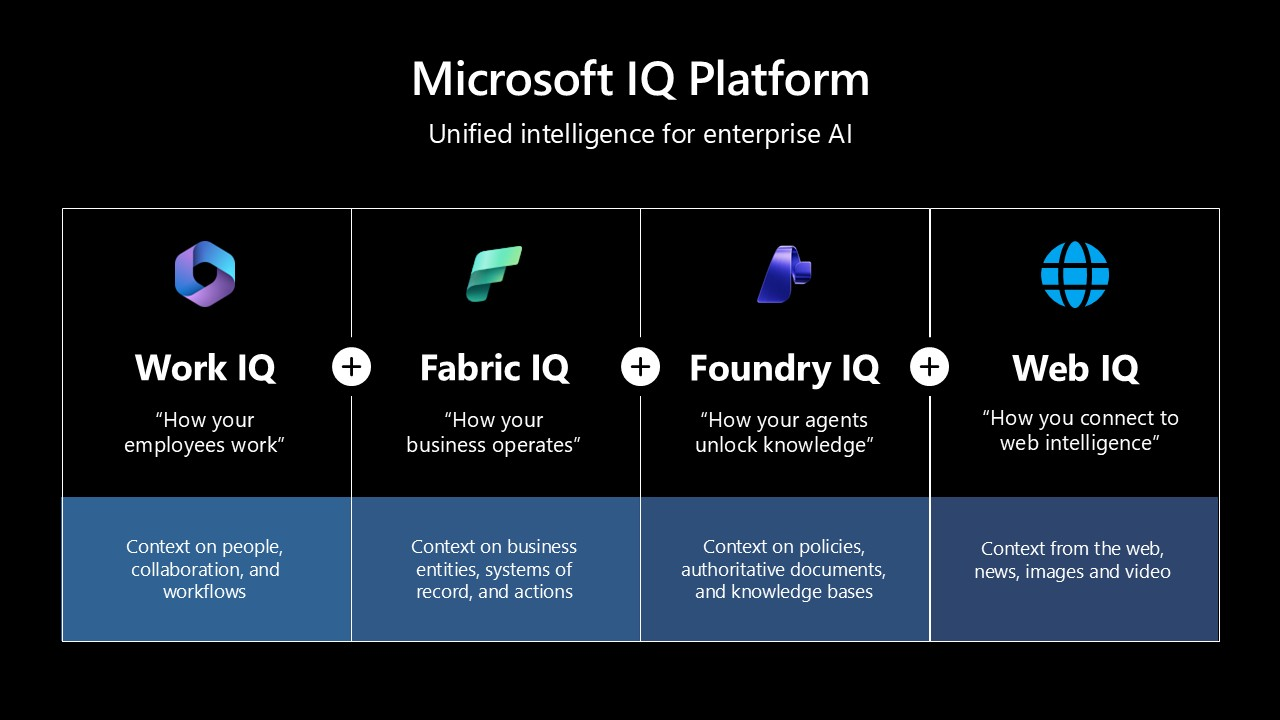
Microsoft IQ is an enterprise intelligence layer that unifies your data, business knowledge, and work context into one shared context for AI — so agents make faster, better-grounded decisions. Each IQ grounds a different slice of that context:
| Microsoft IQ | What it grounds on |
|---|---|
| Fabric IQ | Unified data, semantic models, and ontologies in Microsoft Fabric — the live state of your business. |
| Foundry IQ | Enterprise knowledge and retrieval — the federation layer you build here. |
| Work IQ | Work context across Microsoft 365 — mail, chats, files, and meetings. |
| Web IQ | Fresh, real-world intelligence from the open web — web and news. |
Foundry IQ is the layer that federates them: one Knowledge Base that fans a single question across every source, then plans, retrieves, reranks, and returns one cited answer. It runs on Azure AI Search agentic retrieval.
You'll build it one layer at a time — each layer makes your agent smarter:
| Layer | Grounds on | Setup |
|---|---|---|
| 📁 Your files (start here) | Documents you upload straight into Foundry IQ | None — runs out of the box |
| 🌐 Web IQ | The live web — web + news | Waitlist |
| 👥 Work IQ | Microsoft 365 mail, chats, files, meetings | Gated + licensed |
| 📊 Fabric IQ | Your business as an ontology in Microsoft Fabric | An ontology or data agent |
Start with the file hero — it works with zero setup. Then add the optional layers you have access to; each one re-queries the Knowledge Base so you can see the new intelligence. Every optional layer skips cleanly if you're not set up for it, so the notebook always runs top to bottom.
For a full, deployable reference that combines Work IQ, Foundry IQ, and Fabric IQ end to end, see the Microsoft IQ Solution Accelerator.
1 · Setup
You need an Azure AI Search service and a Microsoft Foundry project with two deployments:
- a chat model (e.g.
gpt-4.1) — for query planning and answer synthesis, and - an embedding model (e.g.
text-embedding-3-large) — for vectorizing your file content.
Set these in your shell, or drop them in a local .env next to this notebook — secrets are read from the environment, never written into the notebook:
SEARCH_ENDPOINT=https://<your-search-service>.search.windows.net
SEARCH_API_KEY=<your-search-admin-key>            # omit to go keyless (see below)
AOAI_ENDPOINT=https://<your-foundry-resource>.openai.azure.com
AOAI_API_KEY=<your-azure-openai-key>              # omit to go keyless (see below)
AOAI_GPT_DEPLOYMENT=gpt-4.1                        # chat — query planning + synthesis
AOAI_EMBEDDING_DEPLOYMENT=text-embedding-3-large  # embeddings — vectorize file content

# Optional — each unlocks one extra layer (leave blank to skip):
WEB_IQ_MCP_API_KEY=<your-web-iq-mcp-key>          # Web IQ
FABRIC_WORKSPACE_ID=<your-fabric-workspace-id>    # Fabric IQ
FABRIC_ONTOLOGY_ID=<your-fabric-ontology-id>      # Fabric IQ
Prefer keyless? Assign your identity Search Service Contributor on the search service and Cognitive Services User on the Foundry resource, then leave
SEARCH_API_KEYandAOAI_API_KEYblank — the next cell falls back toDefaultAzureCredential. (Web IQ has no managed identity, so its MCP source always authenticates with thex-apikeykey.)
%%capture
# Foundry IQ rides on the public-preview azure-search-documents SDK (ships on PyPI).
import importlib.metadata as _md

try:
    _ok = _md.version("azure-search-documents").startswith("12.1.0b")
except _md.PackageNotFoundError:
    _ok = False

if not _ok:
    %pip install --quiet --pre "azure-search-documents==12.1.0b1" \
        "azure-identity>=1.17.1" "openai>=1.40.0" "python-dotenv>=1.0.1" "tenacity>=8.2.0"
The next cell is the whole engine: it reads your config, then defines two helpers you'll use for the rest of the notebook — build_kb(sources) (create/update the Foundry IQ Knowledge Base over a set of sources) and ask(question) (send one natural-language question and print the cited answer plus which sources grounded it). Each layer below just creates a Knowledge Source, appends it, and calls these two.
import os
from pathlib import Path
from typing import Optional

from azure.core.credentials import AzureKeyCredential
from azure.core.exceptions import ResourceNotFoundError
from azure.identity import DefaultAzureCredential
from azure.search.documents import __version__ as sdk_version
from azure.search.documents.indexes import SearchIndexClient
from azure.search.documents.indexes.models import (
    AzureOpenAIVectorizerParameters,
    KnowledgeBase,
    KnowledgeBaseAzureOpenAIModel,
    KnowledgeSourceReference,
)
from azure.search.documents.knowledgebases import KnowledgeBaseRetrievalClient
from azure.search.documents.knowledgebases.models import (
    FabricOntologyKnowledgeSourceParams,
    FileKnowledgeSourceParams,
    KnowledgeBaseMessage,
    KnowledgeBaseMessageTextContent,
    KnowledgeBaseRetrievalRequest,
    KnowledgeRetrievalLowReasoningEffort,
    KnowledgeRetrievalOutputMode,
    KnowledgeSourceAzureOpenAIVectorizer,
    KnowledgeSourceIngestionParameters,
    McpServerKnowledgeSourceParams,
    WorkIQKnowledgeSourceParams,
)
from dotenv import load_dotenv
from tenacity import retry, retry_if_exception, stop_after_attempt, wait_exponential

load_dotenv(override=True)


def env(name: str, *, required: bool = True, default: Optional[str] = None) -> Optional[str]:
    value = os.getenv(name, default)
    if required and not value:
        raise RuntimeError(f"Missing required env var: {name}")
    return value or None


def skip(layer: str, reason: str) -> None:
    print(f"[skipped] {layer}: {reason}")


# ---- Config --------------------------------------------------------------
SEARCH_ENDPOINT = env("SEARCH_ENDPOINT")
SEARCH_API_KEY = env("SEARCH_API_KEY", required=False)  # blank -> managed identity
AOAI_ENDPOINT = env("AOAI_ENDPOINT").split("/openai/", 1)[0].rstrip("/")
AOAI_API_KEY = env("AOAI_API_KEY", required=False)      # blank -> managed identity
GPT_DEPLOYMENT = env("AOAI_GPT_DEPLOYMENT", required=False, default="gpt-4.1")
EMBEDDING_DEPLOYMENT = env("AOAI_EMBEDDING_DEPLOYMENT", required=False, default="text-embedding-3-large")

KS_FILES = "miq-ks-files"
KS_WEB_IQ = "miq-ks-web-iq"
KS_WORK_IQ = "miq-ks-work-iq"
KS_FABRIC_IQ = "miq-ks-fabric-iq"
KB_NAME = "miq-foundry-iq-kb"

# Key if provided, else keyless via Microsoft Entra (DefaultAzureCredential).
credential = AzureKeyCredential(SEARCH_API_KEY) if SEARCH_API_KEY else DefaultAzureCredential()
index_client = SearchIndexClient(endpoint=SEARCH_ENDPOINT, credential=credential)
kb_client = KnowledgeBaseRetrievalClient(
    endpoint=SEARCH_ENDPOINT, credential=credential, knowledge_base_name=KB_NAME,
)

kb_sources: list[str] = []  # grows as you add layers; drives the KB and cleanup


def _aoai(deployment: str) -> AzureOpenAIVectorizerParameters:
    # api_key=None -> the search service uses its managed identity for Azure OpenAI.
    return AzureOpenAIVectorizerParameters(
        resource_url=AOAI_ENDPOINT, deployment_name=deployment,
        api_key=AOAI_API_KEY, model_name=deployment,
    )


def file_ingestion_parameters() -> KnowledgeSourceIngestionParameters:
    """Minimal extraction + Foundry embedding for the uploaded-files layer."""
    return KnowledgeSourceIngestionParameters(
        content_extraction_mode="minimal",
        embedding_model=KnowledgeSourceAzureOpenAIVectorizer(azure_open_ai_parameters=_aoai(EMBEDDING_DEPLOYMENT)),
    )


# Work IQ + Fabric IQ enforce per-user permissions: pass the signed-in user's
# token on retrieve. Best-effort -- Web IQ + files work without it.
try:
    USER_TOKEN = DefaultAzureCredential().get_token("https://search.azure.com/.default").token
except Exception as exc:  # noqa: BLE001
    USER_TOKEN = None
    print(f"(no user token: {exc}; Work IQ + Fabric IQ will return no references)")


def build_kb(sources: list[str]) -> None:
    """Create/update the one Foundry IQ Knowledge Base over `sources`."""
    kb = KnowledgeBase(
        name=KB_NAME,
        description="Foundry IQ Knowledge Base layering your files, Web IQ, Work IQ, and Fabric IQ.",
        models=[KnowledgeBaseAzureOpenAIModel(azure_open_ai_parameters=_aoai(GPT_DEPLOYMENT))],
        knowledge_sources=[KnowledgeSourceReference(name=n) for n in sources],
        retrieval_reasoning_effort=KnowledgeRetrievalLowReasoningEffort(),
        output_mode=KnowledgeRetrievalOutputMode.ANSWER_SYNTHESIS,
        retrieval_instructions=(
            "Route each subquery to the source most likely to answer it: use the files "
            "source for uploaded company documents; Web IQ for current events and public "
            "information; Work IQ for internal people and collaboration context; Fabric IQ "
            "for live business facts from the ontology. Use several when a question spans more than one."
        ),
        answer_instructions="Answer only from the retrieved content and keep the [ref_id:N] citations.",
    )
    index_client.create_or_update_knowledge_base(kb)
    print(f"Knowledge Base '{KB_NAME}' now covers {len(sources)} source(s): {', '.join(sources)}")


def _ks_params(name: str):
    common = dict(knowledge_source_name=name, include_references=True, include_reference_source_data=True)
    if name == KS_FILES:
        return FileKnowledgeSourceParams(**common)
    if name == KS_WEB_IQ:
        return McpServerKnowledgeSourceParams(knowledge_source_name=name, include_references=True)
    if name == KS_WORK_IQ:
        return WorkIQKnowledgeSourceParams(**common)
    if name == KS_FABRIC_IQ:
        return FabricOntologyKnowledgeSourceParams(reranker_threshold=0.0, **common)
    return None


# A KB update takes a few seconds to reach the retrieve path, so a query fired
# immediately after build_kb() can transiently 400 with "must match a Knowledge
# Base Knowledge Source name". tenacity retries just that case while it propagates.
@retry(
    retry=retry_if_exception(lambda e: "must match" in str(e)),
    wait=wait_exponential(multiplier=1, min=3, max=20),
    stop=stop_after_attempt(5),
    reraise=True,
)
def _retrieve(request):
    return kb_client.retrieve(request, query_source_authorization=USER_TOKEN)


def ask(question: str, *, max_runtime_seconds: int = 180) -> None:
    """Send one question to the KB; print the cited answer and grounding sources."""
    request = KnowledgeBaseRetrievalRequest(
        messages=[KnowledgeBaseMessage(role="user", content=[KnowledgeBaseMessageTextContent(text=question)])],
        knowledge_source_params=[p for p in (_ks_params(n) for n in kb_sources) if p],
        include_activity=True,
        max_runtime_in_seconds=max_runtime_seconds,
    )
    result = _retrieve(request)
    answer = "\n\n".join(
        c.text for m in (result.response or []) for c in (m.content or []) if getattr(c, "text", None)
    ).strip()
    grounded: dict = {}
    for r in (result.references or []):
        t = getattr(r, "type", None)
        grounded[t] = grounded.get(t, 0) + 1
    print(f"Q: {question}\n\n{answer or '(no answer)'}\n\ngrounded by: {grounded}")


def enable(ks_name: str, question: str, *, max_runtime_seconds: int = 180) -> None:
    """Add a just-created Knowledge Source to the KB, re-query, and (if the query
    fails) roll the source back out so later layers stay clean."""
    kb_sources.append(ks_name)
    try:
        build_kb(kb_sources)
        ask(question, max_runtime_seconds=max_runtime_seconds)
    except Exception as exc:  # noqa: BLE001
        kb_sources.remove(ks_name)
        if kb_sources:
            build_kb(kb_sources)
        skip(ks_name, f"created the source but the query failed: {str(exc)[:140]}")


auth_mode = "api key" if SEARCH_API_KEY else "managed identity (keyless)"
print(f"azure-search-documents {sdk_version}  |  search: {SEARCH_ENDPOINT}  |  auth: {auth_mode}")
print(f"chat: {GPT_DEPLOYMENT}  |  embedding: {EMBEDDING_DEPLOYMENT}")
2 · Start with your files 📁
The fastest knowledge layer: upload files straight into Foundry IQ — no storage account, no indexer, no data source. Foundry IQ extracts and embeds each file for you (kind="file"). To run with zero setup, the cell below writes a tiny built-in company brief and uploads that; point ZAVA_FILE at your own PDF / DOCX / HTML / TXT to use real documents.
Create the Knowledge Source, upload, build_kb(), and ask() — your agent can already answer from your files.
Learn more: Knowledge sources in Foundry IQ
from azure.search.documents.indexes.models import FileKnowledgeSource, FileKnowledgeSourceParameters

# Built-in sample so the hero runs with zero setup. Replace with your own files
# by setting ZAVA_FILE to a local path.
sample = Path("data/microsoft-iq-in-foundry/zava-brief.md")
sample.parent.mkdir(parents=True, exist_ok=True)
sample.write_text(
    "# Zava Air \u2014 Company Brief\n\n"
    "Zava Air is a mid-size carrier specializing in transatlantic routes between "
    "North America and Europe. Our strategy is to standardize on fuel-efficient "
    "widebody aircraft and grow premium-cabin capacity on long-haul corridors.\n\n"
    "## Fleet strategy\n"
    "- Consolidate around two widebody families to simplify maintenance and crew training.\n"
    "- Prioritize range and fuel efficiency for transatlantic missions.\n"
    "- Retire older narrowbodies as widebody deliveries arrive.\n\n"
    "## Network\n"
    "Primary hubs anchor the transatlantic network; we add seasonal frequency on the "
    "highest-demand premium corridors.\n",
    encoding="utf-8",
)
file_path = Path(env("ZAVA_FILE", required=False, default=str(sample))).expanduser()

# 1) Create the File Knowledge Source.
index_client.create_or_update_knowledge_source(
    FileKnowledgeSource(
        name=KS_FILES,
        description="Your own files, uploaded straight into Foundry IQ -- no storage account.",
        file_parameters=FileKnowledgeSourceParameters(ingestion_parameters=file_ingestion_parameters()),
    )
)


# 2) Upload the file (pass filename so Foundry can label the blob). The upload
#    triggers a synchronous embed pass, which can transiently 429 on shared
#    embedding deployments -- tenacity retries that with exponential backoff.
@retry(
    retry=retry_if_exception(lambda e: "429" in str(e)),
    wait=wait_exponential(multiplier=1, min=2, max=30),
    stop=stop_after_attempt(5),
    reraise=True,
)
def upload_file():
    with file_path.open("rb") as fh:
        return index_client.upload_knowledge_source_file(KS_FILES, fh.read(), filename=file_path.name)


uploaded = upload_file()
print(f"Uploaded {file_path.name} ({uploaded.file_size_bytes:,} bytes)")

# 3) Build the KB over just your files, and ask.
kb_sources.append(KS_FILES)
build_kb(kb_sources)
ask("What does Zava Air do, and what is its fleet strategy?")
3 · Add Web IQ 🌐
Web IQ grounds your agent in the live web — web and news — through the remote Microsoft Grounding MCP server, with nothing to index. It authenticates with a stored x-apikey header.
Get access: Web IQ is waitlisted — join the waitlist. Once approved, set
WEB_IQ_MCP_API_KEYand re-run. No key yet? This layer skips and the notebook keeps going.
Learn more: Web IQ
from azure.search.documents.indexes.models import (
    McpServerKnowledgeSource,
    McpServerKnowledgeSourceParameters,
    McpServerStoredHeadersAuthentication,
    McpServerStoredHeadersParameters,
)

web_key = env("WEB_IQ_MCP_API_KEY", required=False)  # secret -- env only
if not web_key:
    skip("Web IQ", "set WEB_IQ_MCP_API_KEY to add live web grounding -- waitlist: https://aka.ms/webiq-waitlist")
else:
    tools = [
        {"name": t, "outputParsing": {"kind": "auto"}, "inclusionMode": "reranked", "maxOutputTokens": 4096}
        for t in ("web", "news")
    ]
    index_client.create_or_update_knowledge_source(
        McpServerKnowledgeSource(
            name=KS_WEB_IQ,
            description="Web IQ -- Microsoft Grounding MCP server (web, news).",
            mcp_server_parameters=McpServerKnowledgeSourceParameters(
                server_url="https://api.microsoft.ai/v3/mcp",
                # storedHeaders auth: send the Web IQ x-apikey directly.
                authentication=McpServerStoredHeadersAuthentication(
                    stored_headers_parameters=McpServerStoredHeadersParameters(headers={"x-apikey": web_key}),
                ),
                tools=tools,
            ),
        )
    )
    enable(KS_WEB_IQ, "What's the latest public news on transatlantic routes and long-haul aircraft?")
4 · Add Work IQ 👥
Work IQ grounds your agent in how your people work — Microsoft 365 mail, chats, files, and meetings — enforcing each user's permissions at query time. The typed model is tiny: just a name and description.
Get access: Work IQ is gated + licensed. Register the
EnableFoundryIQWithWorkIQflag, re-registerMicrosoft.Search, have a tenant admin complete the access request form, and give each user a Microsoft 365 Copilot license. Not entitled yet? This layer skips. (Work IQ can take 40–60s to answer.)
Learn more: Work IQ knowledge source
from azure.search.documents.indexes.models import WorkIQKnowledgeSource

try:
    index_client.create_or_update_knowledge_source(
        WorkIQKnowledgeSource(name=KS_WORK_IQ, description="Work IQ -- M365 mail, chats, files, meetings.")
    )
except Exception as exc:  # noqa: BLE001
    skip("Work IQ", f"tenant not entitled yet ({exc}) -- request access: https://aka.ms/foundry-iq-work-iq-admin-consent-form")
else:
    enable(KS_WORK_IQ, "Summarize what we've discussed internally about transatlantic route planning.")
5 · Add Fabric IQ 📊
Fabric IQ grounds your agent in the live state of your business in Microsoft Fabric. You can bring either a Fabric ontology (entities, relationships, rules) or a Fabric data agent as a knowledge source. This recipe uses an ontology as the example; point it at your own.
Get access: you need a Fabric ontology item (or data agent) in the same Entra tenant as your Search service. Both IDs are in the ontology item URL —
.../groups/<workspace-id>/ontologies/<ontology-id>— set them asFABRIC_WORKSPACE_ID/FABRIC_ONTOLOGY_ID. Not set? This layer skips.
Learn more: Fabric ontology knowledge source · Fabric data agent knowledge source
from azure.search.documents.indexes.models import (
    FabricOntologyKnowledgeSource,
    FabricOntologyKnowledgeSourceParameters,
)

workspace_id = env("FABRIC_WORKSPACE_ID", required=False)
ontology_id = env("FABRIC_ONTOLOGY_ID", required=False)
if not (workspace_id and ontology_id):
    skip("Fabric IQ", "set FABRIC_WORKSPACE_ID and FABRIC_ONTOLOGY_ID (from your ontology item URL) to add live business data")
else:
    index_client.create_or_update_knowledge_source(
        FabricOntologyKnowledgeSource(
            name=KS_FABRIC_IQ,
            description="Fabric IQ -- your business ontology in Microsoft Fabric.",
            fabric_ontology_parameters=FabricOntologyKnowledgeSourceParameters(
                workspace_id=workspace_id, ontology_id=ontology_id,
            ),
        )
    )
    enable(KS_FABRIC_IQ, "From our ontology, how many aircraft are in the fleet, grouped by manufacturer?")
6 · Ask across every layer
Now the payoff. Send one question that no single layer can answer alone — Foundry IQ plans the subqueries, routes each to the right Microsoft IQ (steered by the retrieval_instructions from §1), reranks, and synthesizes one cited answer across whatever layers you enabled.
ask(
    "I'm prepping a transatlantic route-planning review. What is our fleet strategy "
    "and composition (from our files and our ontology), the latest public news on "
    "long-haul aircraft, and anything we've discussed internally?"
)
7 · Take it further — ground a Foundry agent
Your Knowledge Base also exposes a Model Context Protocol (MCP) endpoint, so the same Microsoft IQ layer grounds any MCP-compatible agent — no re-plumbing:
{SEARCH_ENDPOINT}/knowledgebases/{KB_NAME}/mcp?api-version=2026-05-01-preview
It exposes one knowledge_base_retrieve tool. The most direct next step is to connect this Knowledge Base — with all your IQs — to a Foundry agent:
- Foundry Agent Service — connect the Knowledge Base to an agent in a few clicks or with the SDK. See Connect Foundry IQ to an agent.
- Microsoft Agent Framework — register the MCP endpoint as a tool on your agent.
- GitHub Copilot (VS Code) — add the URL to
.vscode/mcp.jsonwith anapi-keyheader, then use Agent mode.
8 · Clean up
The Knowledge Base and Knowledge Sources are stateful. Delete them so a re-run starts clean — comment this out to keep the KB for the §7 consumers.
try:
    index_client.delete_knowledge_base(KB_NAME)
    print(f"Deleted KB {KB_NAME}")
except ResourceNotFoundError:
    pass
except Exception as exc:  # noqa: BLE001
    print(f"KB delete: {exc}")

for ks_name in (KS_FILES, KS_WEB_IQ, KS_WORK_IQ, KS_FABRIC_IQ):
    try:
        index_client.delete_knowledge_source(ks_name)
        print(f"Deleted KS {ks_name}")
    except ResourceNotFoundError:
        pass
    except Exception as exc:  # noqa: BLE001
        print(f"KS {ks_name} delete: {exc}")
9 · Next steps
You built a Microsoft IQ knowledge layer — starting from your own files, then layering in Web IQ, Work IQ, and Fabric IQ, all federated by Foundry IQ into one Knowledge Base you query with a single ask(). From here:
- Ground a Foundry agent. Connect this Knowledge Base — with all your IQs — to an agent: Connect Foundry IQ to an agent.
- Tour every Knowledge Source type. The companion recipe Mastering Foundry IQ walks indexed, uploaded, and federated sources end to end.
- Go end to end. The Microsoft IQ Solution Accelerator combines Work IQ, Foundry IQ, and Fabric IQ into a deployable disruption-response solution.