
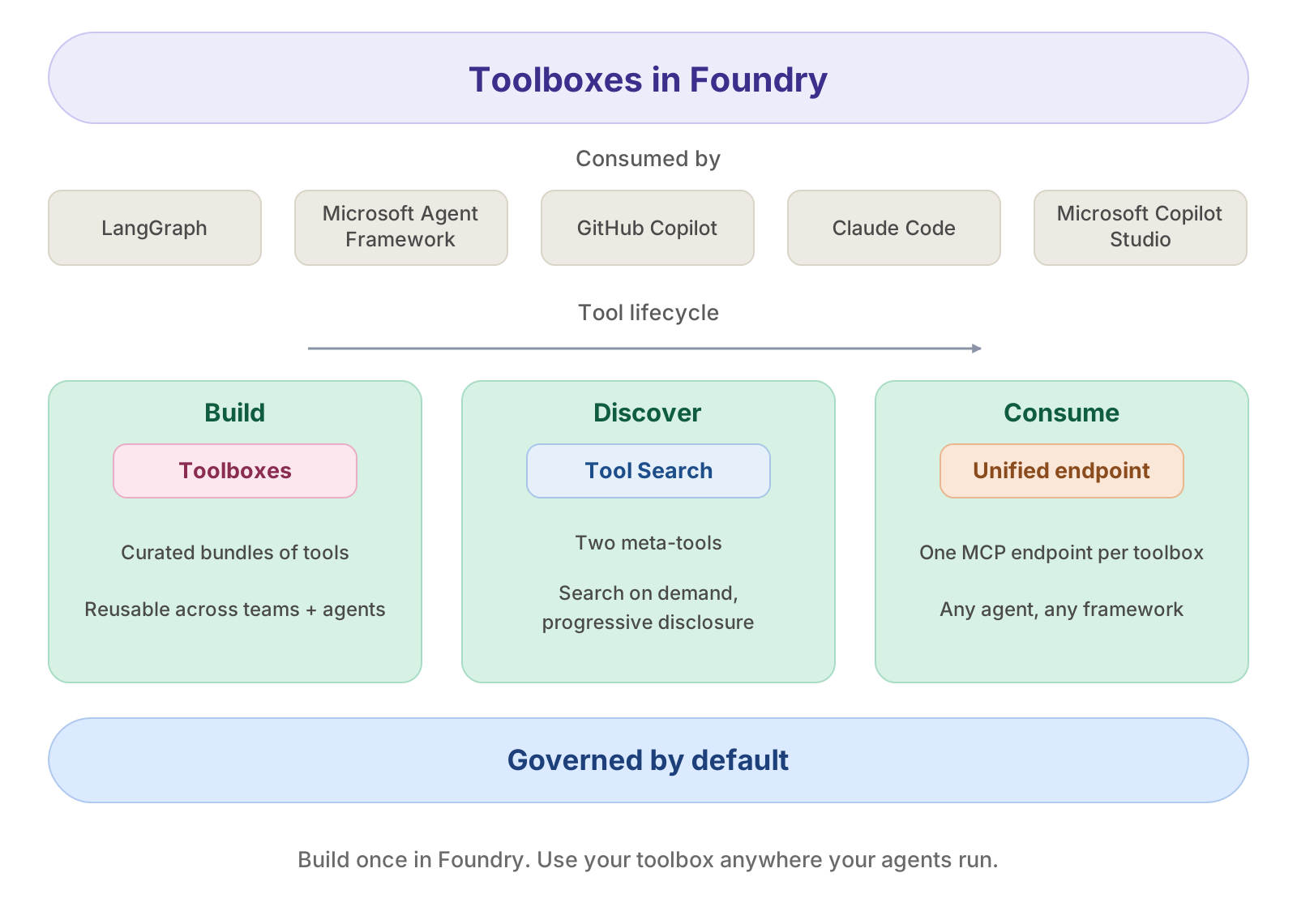
When several agents - or a mix of Foundry hosted agents, Microsoft Agent Framework, LangGraph, and Copilot SDK apps - need the same governed set of tools, you don't want to re-wire those tools and their auth into every one. The pattern that scales: package the tools once behind a single versioned, governed MCP endpoint, make them discoverable, and let every runtime consume them from the same URL.
This recipe teaches that pattern with Toolboxes in Microsoft Foundry, as a reference walkthrough. The runnable core spine is short - build a toolbox version, turn on Tool Search, verify it over MCP, and consume it from Microsoft Agent Framework. Around that spine sits a catalog of every other tool type, the REST/CI path, versioning, and governance policies - optional sections you can skip on a first read.
Three pillars, all available today
Toolbox packages the full tool experience into three pillars you use together. You define a curated set of tools once, manage them centrally in Foundry, and expose them through a single MCP-compatible endpoint that any agent can consume - the platform handles credential injection, token refresh, and policy enforcement at runtime.
| Pillar | What it enables |
|---|---|
| 1 · Build & curate | Select tools, configure their authentication centrally, and publish a reusable, versioned toolbox that any team or agent consumes from one MCP endpoint. |
| 2 · Discover with Tool Search | Agents discover tools on demand: the model starts each turn with two meta-tools and pulls in only the tools a step needs (progressive disclosure), so the prompt stays small no matter how many tools the toolbox holds. |
| 3 · Govern | Screen every tool's inputs/outputs with an RAI guardrail, and front your MCP servers with a bring-your-own AI gateway (APIM). Governed by default - with more governance controls to come. |
Because a toolbox is a managed resource, you can add, remove, or reconfigure tools without changing agent code - every agent connects to the same endpoint. Versioning gives you explicit control over when changes take effect: create and test a new version, then promote it to default; every consumer picks up the promoted version automatically, with no code changes or redeployment.
By the end, you'll be able to
- Build & curate a versioned toolbox that exposes multiple tool types behind one MCP endpoint, with per-connection identity so every consumer inherits correct, least-privilege access.
- Discover tools with Tool Search - progressive disclosure keeps a large toolbox as cheap for the model to use as a small one.
- Govern the toolbox with an RAI guardrail and a bring-your-own MCP gateway.
- Consume the same toolbox unchanged from Agent Framework, LangGraph, and the Copilot SDK.
Preview. Toolbox, Tool Search, A2A, Browser Automation, Skills, and the Work IQ / Fabric IQ tools are in preview. APIs and headers may change. Past the two required vars (
PROJECT_ENDPOINT,MODEL_DEPLOYMENT), every optional section is skip-guarded - leave its env vars blank and it's skipped cleanly, so the notebook runs top-to-bottom with only a project provisioned.
1 / Prerequisites + environment
| Microsoft Foundry project | A project endpoint (https://<resource>.services.ai.azure.com/api/projects/<project>) with at least one model deployment. |
| Azure CLI | az login so DefaultAzureCredential can pick up your identity. |
(Optional) Azure Developer CLI (azd) |
The Foundry azd extension (azd extension install azure.ai.agents) for creating connections / shipping from CI. |
| Python | 3.10+ (the optional Copilot SDK section in step 11 needs 3.11+). |
| (Optional) connections | Azure AI Search, an MCP server, an OpenAPI host, an A2A agent - each only needed for the matching tool below. Create them in the Foundry portal or with azd ai connection create. |
Every connection-backed tool is optional. The toolbox is created from whatever you provide; blank env vars skip their section.
Configure your environment
Set these in your shell or a local .env (loaded with python-dotenv). Only
PROJECT_ENDPOINT is required to create a toolbox; MODEL_DEPLOYMENT is optional and
defaults to gpt-4.1-mini (it is only used by the consumer agents in step 11).
Runtime & cost: the core spine takes a few minutes end-to-end and creates a couple of toolbox versions. Steps 11 (Agent Framework, LangGraph, Copilot SDK) invoke live web search and model inference, which bill against your Foundry project and any connection-backed tools.
# ---- Required ----
PROJECT_ENDPOINT="https://<resource>.services.ai.azure.com/api/projects/<project>"
MODEL_DEPLOYMENT="gpt-4.1-mini"

# ---- Optional: name of the toolbox we create/update ----
TOOLBOX_NAME="my-toolbox"

# ---- Optional: project CONNECTION IDs for the tools that need them ----
# A connection ID is the connection's name OR its full ARM resource id
# (/subscriptions/.../connections/<name>). Leave a value blank to skip that tool.
MCP_SERVER_URL=""                            # remote MCP server URL (may be APIM-fronted)
MCP_SERVER_LABEL="custom_mcp"                # label that namespaces the MCP server's tools
MCP_PROJECT_CONNECTION_ID=""                 # connection backing the MCP server (auth)
AISEARCH_PROJECT_CONNECTION_ID=""            # Azure AI Search connection (key or MI)
AISEARCH_INDEX=""                            # index name to expose
OPENAPI_PROJECT_CONNECTION_ID=""             # connection backing an OpenAPI tool (key or MI)
A2A_PROJECT_CONNECTION_ID=""                 # connection to a downstream A2A agent
A2A_ENDPOINT=""                              # optional: A2A base URL if the connection has no target
WORK_IQ_PROJECT_CONNECTION_ID=""             # Work IQ (Microsoft 365) connection (oauth2)
FABRIC_IQ_PROJECT_CONNECTION_ID=""           # Fabric IQ (Microsoft Fabric) connection (MI or oauth2)
BROWSER_AUTOMATION_PROJECT_CONNECTION_ID=""  # Azure Playwright connection (key)
BING_CUSTOM_SEARCH_PROJECT_CONNECTION_ID=""  # Bing Custom Search connection (key)
BING_CUSTOM_SEARCH_INSTANCE=""               # Bing Custom Search instance name
FILE_SEARCH_VECTOR_STORE_ID=""               # vector store id for File Search
SKILL_NAME=""                                # name of a published skill to include
SKILL_VERSION=""                             # optional: pin a skill version
RAI_POLICY_NAME=""                           # existing RAI policy for the policies section
%%capture
# Toolboxes in Microsoft Foundry ship on the public-preview azure-ai-projects SDK (the typed
# toolbox + tool bindings live under project.toolboxes as of SDK 2.3.0). mcp gives us a
# JSON-RPC client for the raw endpoint, langchain-azure-ai[tools] + langchain-mcp-adapters
# provide the LangGraph adapter, and agent-framework the MAF consumer. All on PyPI.
import importlib.metadata as _md
from packaging.specifiers import SpecifierSet
from packaging.version import Version

# (package, required version range) - validated against what is ACTUALLY installed, not just
# presence. A present-but-too-old package (e.g. azure-ai-projects 2.2.x) is added to _need so it
# gets upgraded; otherwise the toolbox imports below raise the preview-class ImportError.
_requirements = {
    "azure-ai-projects": ">=2.3.0,<2.4.0",
    "azure-identity": ">=1.17.0",
    "mcp": ">=1.0.0",
    "httpx": ">=0.27.0",
    "python-dotenv": ">=1.0.0",
    "langchain-azure-ai": ">=1.2.4",
    "langchain-mcp-adapters": ">=0.1.0",
    "agent-framework": ">=1.4.0",
}

_need = []
for _pkg, _spec in _requirements.items():
    try:
        _installed = _md.version(_pkg)
    except _md.PackageNotFoundError:
        _need.append(_pkg)
        continue
    if not SpecifierSet(_spec).contains(_installed, prereleases=True):
        _need.append(_pkg)

if _need:
    %pip install --quiet \
        "azure-ai-projects>=2.3.0,<2.4.0" \
        "azure-identity>=1.17.0" \
        "mcp>=1.0.0" \
        "httpx>=0.27.0" \
        "python-dotenv>=1.0.0" \
        "langchain-azure-ai[tools]>=1.2.4" \
        "langchain-mcp-adapters>=0.1.0" \
        "agent-framework>=1.4.0"
2 / Configure clients + helpers
One AIProjectClient and one DefaultAzureCredential are reused throughout. We also define a
few helpers the rest of the notebook leans on:
env(name, required=False)- env-var lookup with a friendly error.skip(reason)- prints why a section is skipped and returnsTrue, so each optional cell starts withif skip(...): ....mcp_token()- a bearer token scoped tohttps://ai.azure.com/.default, the audience the toolbox MCP endpoint expects.created_resources- a tracker the cleanup section walks in reverse.
import os
from typing import Optional

from azure.identity import DefaultAzureCredential, get_bearer_token_provider
from azure.ai.projects import AIProjectClient
from dotenv import load_dotenv

load_dotenv(override=True)


def env(name: str, *, required: bool = True, default: Optional[str] = None) -> Optional[str]:
    value = os.getenv(name, default)
    if required and not value:
        raise RuntimeError(f"Missing required env var: {name}")
    return value or None


def skip(reason: str) -> bool:
    print(f"⏭️  Skipping — {reason}")
    return True


# ---- Required -----------------------------------------------------------
PROJECT_ENDPOINT = env("PROJECT_ENDPOINT")
MODEL_DEPLOYMENT = env("MODEL_DEPLOYMENT", required=False, default="gpt-4.1-mini")
TOOLBOX_NAME = env("TOOLBOX_NAME", required=False, default="my-toolbox")

# The MCP endpoint audience is ai.azure.com (NOT management.azure.com).
TOOLBOX_SCOPE = "https://ai.azure.com/.default"

credential = DefaultAzureCredential()
project = AIProjectClient(endpoint=PROJECT_ENDPOINT, credential=credential)
_token_provider = get_bearer_token_provider(credential, TOOLBOX_SCOPE)


def mcp_token() -> str:
    """A fresh bearer token for the toolbox MCP endpoint."""
    return _token_provider()


# Walked in reverse by the cleanup section.
created_resources: dict = {"toolbox": None, "versions": [], "connections": []}

print(f"✅ Project: {PROJECT_ENDPOINT}")
print(f"✅ Toolbox name: {TOOLBOX_NAME}")
✅ Project: https://<resource>.services.ai.azure.com/api/projects/<project> ✅ Toolbox name: my-toolbox
3 / Auth & identity
A toolbox tool reaches a downstream system through a project connection, and the connection's auth type decides whose identity is used. This is the single most important design decision in a toolbox - get it right and every consumer inherits correct, least- privilege access automatically.

How a hosted agent authenticates - two steps
- Authorize the agent to the toolbox first. Before it can call the toolbox MCP endpoint at all, the hosted agent's identity must hold the Foundry user role on the project. No role → the toolbox rejects the agent. This is independent of any tool.
- The toolbox then handles each tool's auth based on that connection's auth type:
- For
none,custom-keys,project-managed-identity,agentic-identity, and Foundry-managedoauth2, the toolbox authenticates to the tool using the connection's configured identity - the agent never sees the secret. - For
oauth2anduser-entra-token(managed user identity passthrough), the hosted agent emits the caller / end-user token and passes it to the toolbox; the toolbox uses that token - not the agent identity - to authenticate to the tool. This is how the tool ends up acting as the real end user.
- For
Two identities, better together
Running a toolbox behind a hosted agent puts two identities in play at once, and the platform wires them together for you:
- Agent -> toolbox (the trust boundary). The hosted agent always authenticates to the toolbox MCP endpoint with its own agent managed identity - that identity holds the Foundry user role. This is what gates access to the toolbox itself, independent of any single tool.
- Toolbox -> tool (the end-user passthrough). For
oauth2anduser-entra-tokenconnections, that same hosted agent forwards the caller's end-user Entra token, and the toolbox uses that token (OBO) to reach the downstream tool. The tool then acts as the real end user - per-user, least-privilege access with correct downstream audit.
That's the better-together story: you keep the agent's managed identity as the stable, governable
boundary to the toolbox, and still get true end-user identity on the downstream data call -
without writing any OAuth/token-exchange plumbing in your agent code. (For non-OBO auth types the
tool runs under the connection's own identity - the project MI, an API key, or the agent's own
per-project agentic-identity - and no user token is forwarded.)
Auth support is tool-type specific
Only MCP and A2A accept all six auth types (each one is defined in detail in 4e · Remote MCP server below). Every other tool type supports a narrower subset - pick a connection auth type the tool actually allows:
| Tool type | Supported auth types |
|---|---|
| MCP, A2A | none, custom-keys, oauth2, user-entra-token, project-managed-identity, agentic-identity |
| AI Search | custom-keys, project-managed-identity |
| Web Search (custom search) | api-key (Bing Custom Search) |
| OpenAPI | none, custom-keys, project-managed-identity |
| Work IQ | oauth2 |
| Fabric IQ | oauth2, user-entra-token |
| Browser Automation | api-key (Playwright Workspaces) |
OAuth consent. The first call through an oauth2 connection returns a
CONSENT_REQUIRED error (JSON-RPC code -32006) carrying a consent URL. Open it,
consent once, then retry - we handle exactly this in the verify section.
Creating the connections (this is not an SDK-from-Python step)
A connection is a project resource an admin creates once; tools then reference it by id. You do not create connections from the toolbox SDK. The real ways to create one:
- Foundry portal - Build -> Tools -> Connect a tool (or Management -> Connected resources -> New connection). This is the easiest path and it drives the OAuth consent UI for you.
- Azure Developer CLI (
azd) - the Foundryazdextension creates connections from the terminal or CI, e.g.azd ai connection create <name> --kind remote-tool --target <url> --auth-type <auth-type>(use--kind cognitive-searchfor an Azure AI Search connection). This is the source-control-friendly path. - Connections REST / ARM API -
PUT .../projects/{p}/connections/{name}with the auth type in the body (what the portal andazdcall under the hood).
The connection's auth type is chosen at creation time (narrowed per the support table above). Whatever you pick is what the tool uses at runtime - the agent code never sets auth.
The connection category depends on the tool: MCP and Fabric IQ use
RemoteTool; A2A and Work IQ useRemoteA2A; Azure AI Search usesCognitiveSearch. Inazd,--kind remote-toolcreates aRemoteToolconnection,--kind remote-a2aaRemoteA2Aone, and--kind cognitive-searchaCognitiveSearchone.
Two-step auth at runtime (worth internalizing before you build):
- The hosted agent's identity must hold the Foundry user role on the project, or the toolbox rejects the call before any tool runs.
- The toolbox then authenticates to each tool per the connection's auth type. For most types it uses the connection's configured identity; for oauth2 and user-entra-token the agent emits the caller / end-user token and the toolbox uses that token to reach the tool.
# You reference a connection by its id (or name). List the ones already on your
# project so you can copy the right value into the *_PROJECT_CONNECTION_ID env vars
# used by the build cells below. (This is a real SDK call - connections are read
# through the project client even though they are CREATED out-of-band.)
try:
    conns = list(project.connections.list())
    if conns:
        print(f"{len(conns)} connection(s) on this project:\n")
        for c in conns:
            print(f"  {c.name:30s}  type={getattr(c, 'type', '?')}")
        print("\nCopy a name/id into the matching *_PROJECT_CONNECTION_ID env var.")
    else:
        print("No connections yet - create one in the portal (Build -> Tools -> Connect a tool).")
except Exception as exc:  # noqa: BLE001 - informational only
    skip(f"Could not list connections ({exc!r}). Create them in the Foundry portal.")
25 connection(s) on this project: my-github-connection type=RemoteTool my-mcp-server type=RemoteTool my-openapi-connection type=RemoteTool my-aisearch-connection type=ConnectionType.AZURE_AI_SEARCH my-sharepoint-connection type=ConnectionType.CUSTOM my-a2a-agent type=RemoteA2A ... (25 total; tenant-specific connection names redacted for publication) Copy a name/id into the matching *_PROJECT_CONNECTION_ID env var.
4 / Build a toolbox version (SDK)
A toolbox is a named resource; its capabilities live in immutable versions. You build a version from a list of typed tool objects plus an optional list of skills, then promote one version to default later.
project.toolboxes.create_version(
    name=TOOLBOX_NAME,
    description="...",                 # human-readable, shown in listings
    tools=[ MCPToolboxTool(...), AzureAISearchToolboxTool(...), ... ],   # one typed object per tool
    skills=[ ToolboxSkillReference(...) ],                 # SEPARATE from tools
    policies=ToolboxPolicies(...),     # optional governance - see the policies section
)
Rules that apply to every tool:
- Use the typed classes from
azure.ai.projects.models. Each part below imports the exact classes it needs at the top of its own cell, so you can lift any single tool into your own code. - Connections are referenced by
project_connection_id- the connection's name or its full ARM resource id. The toolbox resolves the tool's auth from that connection. name+descriptionare optional on every tool and are what Tool Search ranks on, so give each one a crisp description. (MCPToolboxToolinstead usesserver_label+server_description.)- At most one unnamed tool per built-in type is allowed. Two tools of the same type
without a
nameare rejected; give every additional tool aname(tools of different types may each go unnamed). - Skills are NOT tools - they go in the separate
skills=[...]list asToolboxSkillReference(name=..., version=...).
Each block below is skip-guarded on its env vars, so the cells run with just the two required
vars set - you'll get a Web Search + Code Interpreter toolbox. We build the tools list across the
parts (run them top-to-bottom), then create the version in the final part.
Core spine vs. catalog. 4b (Web Search) is the one tool we walk end-to-end; 4c - 4l are a reference catalog of the other tool types - skim or skip them, jump to 4m to create the version, then continue to Tool Search. Every catalog cell is self-contained and skip-guarded.
4a · Start the tool and skill lists
The build is incremental: each tool part appends to a tools list (and Skills appends to a
skills list). Run this once to create the two empty lists, then run the parts you need
top-to-bottom. There is no shared import cell - every part imports its own classes.
tools: list = []   # typed Tool objects, one per tool below
skills: list = []  # ToolboxSkillReference objects (passed separately from tools)
print("Empty tools[] and skills[] ready - run the tool parts you want below.")
Empty tools[] and skills[] ready - run the tool parts you want below.
4b · Web Search
📄 Docs: Web search
What it is. A built-in tool that grounds answers with live web results. No vector store, no data prep - the model decides when to search and Foundry runs the query server-side.
How it works. Plain WebSearchToolboxTool() uses Grounding with Bing (billed under its own
terms, no connection needed). Pass a WebSearchConfiguration instead to scope results to a
Bing Custom Search instance you own - that path runs through a key-based connection.
Key parameters (all optional unless noted):
search_context_size-"low" | "medium" | "high"; how much retrieved context to feed the model (bigger = more grounding, more tokens). Service default is medium.user_location-WebSearchApproximateLocation(country=, region=, city=, timezone=)to bias results geographically.custom_search_configuration- aWebSearchConfiguration(project_connection_id=, instance_name=)(both required) to use Bing Custom Search instead of the public index.name,description- used by Tool Search ranking.
Create the connection (only for the custom-search path; key-based) in the portal under Build
-> Tools -> Connect a tool, or with azd ai connection create ... --auth-type api-key, then
pass its id as WebSearchConfiguration.project_connection_id. The default public web search needs
no connection.
from azure.ai.projects.models import WebSearchToolboxTool, WebSearchConfiguration

if os.getenv("BING_CUSTOM_SEARCH_PROJECT_CONNECTION_ID") and os.getenv("BING_CUSTOM_SEARCH_INSTANCE"):
    tools.append(WebSearchToolboxTool(
        name="web_search_custom",
        description="Search a curated set of sites via Bing Custom Search.",
        search_context_size="medium",  # low | medium | high
        custom_search_configuration=WebSearchConfiguration(
            project_connection_id=os.environ["BING_CUSTOM_SEARCH_PROJECT_CONNECTION_ID"],
            instance_name=os.environ["BING_CUSTOM_SEARCH_INSTANCE"],
        ),
    ))
else:
    tools.append(WebSearchToolboxTool(
        name="web_search",
        description="Search the public web for current information.",
        search_context_size="medium",  # low | medium | high
    ))
print(f"+ Web Search  (tools so far: {len(tools)})")
+ Web Search (tools so far: 1)
4c · Code Interpreter
📄 Docs: Code Interpreter
What it is. A sandboxed Python runtime the model can use to do math, parse text, transform data, and generate files or charts - anything better done by running code than by guessing.
How it works. The model writes Python; Foundry executes it in an isolated container and feeds results back. To analyze your own data, upload files first with the Files API and attach them by id; files the code generates (charts, CSVs) come back as container-file citations you can download. No connection is required - Code Interpreter is fully hosted.
Upload a file with the project's OpenAI client (purpose="assistants"), then attach it:
openai = project.get_openai_client()
file = openai.files.create(purpose="assistants", file=open("data.csv", "rb"))
# attach to the tool: AutoCodeInterpreterToolParam(file_ids=[file.id])
Download a generated file - the run's response annotations carry a container_file_citation
with file_id + container_id; fetch the bytes with:
content = openai.containers.files.content.retrieve(file_id=file_id, container_id=container_id)
with open("chart.png", "wb") as f:
    f.write(content.read())
Key parameters (all optional):
container- either a container id string, or anAutoCodeInterpreterToolParam(file_ids=[...])to attach uploaded files to the sandbox. Omit it to let the service auto-provision a default sandbox.name,description- used by Tool Search ranking.
from azure.ai.projects.models import CodeInterpreterToolboxTool, AutoCodeInterpreterToolParam

# Optional: upload a file for the sandbox to analyze (Files API on the project's OpenAI client).
file_ids = []
if os.getenv("CODE_INTERPRETER_FILE"):
    openai_client = project.get_openai_client()
    up = openai_client.files.create(purpose="assistants", file=open(os.environ["CODE_INTERPRETER_FILE"], "rb"))
    file_ids = [up.id]
    print(f"  uploaded {os.environ['CODE_INTERPRETER_FILE']} as {up.id}")

ci = CodeInterpreterToolboxTool(
    name="code_interpreter",
    description="Run Python in a sandbox for math, parsing, and data work.",
)
if file_ids:
    ci.container = AutoCodeInterpreterToolParam(file_ids=file_ids)
tools.append(ci)
print(f"+ Code Interpreter  (tools so far: {len(tools)})")
+ Code Interpreter (tools so far: 2)
4d · File Search
📄 Docs: File Search
What it is. Retrieval-augmented grounding over your own documents. You load files into one or more vector stores; the tool retrieves the most relevant chunks for each query.
How it works. Create a vector store, upload your files into it, and pass the store id. Use
the project's OpenAI client (project.get_openai_client()) for both steps:
openai = project.get_openai_client()
vector_store = openai.vector_stores.create(name="ProductInfoStore")
with open("product_info.md", "rb") as fh:
    openai.vector_stores.files.upload_and_poll(vector_store_id=vector_store.id, file=fh)
# then: FileSearchToolboxTool(vector_store_ids=[vector_store.id])
vector_store_ids is required, so this part skips unless you supply
FILE_SEARCH_VECTOR_STORE_ID (or set FILE_SEARCH_FILE to create a store below). No connection is
needed - the vector store is a project resource.
Key parameters:
vector_store_ids- requiredlist[str]; the stores to search.max_num_results- optionalint(1-50); cap on retrieved chunks.filters- optional metadata filter (ComparisonFilter/CompoundFilter).name,description- used by Tool Search ranking.
from azure.ai.projects.models import FileSearchToolboxTool

vector_store_id = os.getenv("FILE_SEARCH_VECTOR_STORE_ID")

# No store yet? Create one and upload a file (Files + Vector Stores API).
if not vector_store_id and os.getenv("FILE_SEARCH_FILE"):
    openai_client = project.get_openai_client()
    vs = openai_client.vector_stores.create(name="toolbox-file-search")
    with open(os.environ["FILE_SEARCH_FILE"], "rb") as fh:
        openai_client.vector_stores.files.upload_and_poll(vector_store_id=vs.id, file=fh)
    vector_store_id = vs.id
    print(f"  created vector store {vs.id}")

if vector_store_id:
    tools.append(FileSearchToolboxTool(
        name="file_search",
        description="Search uploaded documents and attached vector stores.",
        vector_store_ids=[vector_store_id],
        # max_num_results=10,  # optional cap on retrieved chunks
    ))
    print(f"+ File Search  (tools so far: {len(tools)})")
else:
    skip("FILE_SEARCH_VECTOR_STORE_ID / FILE_SEARCH_FILE not set - skipping File Search")
⏭️ Skipping — FILE_SEARCH_VECTOR_STORE_ID / FILE_SEARCH_FILE not set - skipping File Search
4e · Remote MCP server
📄 Docs: Model Context Protocol
What it is. A bridge to any external Model Context Protocol server, so every tool that server exposes becomes callable from your toolbox. This is the most common way to bring third-party or in-house tools into Foundry.
How it works. You give it a server_label (namespaces the remote tools in tools/list) and a
server_url (the MCP endpoint). Auth and allow-listing come from the connection named by
project_connection_id. MCP accepts all six auth types.
Key parameters:
server_label- requiredstr; the prefix used to identify this server's tools.server_url- requiredstr; the MCP endpoint URL.project_connection_id- connection holding the auth;Nonemeans a public/no-auth server.require_approval-"never" | "always", or anMCPToolRequireApproval(always=, never=)filter to gate specific tools.allowed_tools- alist[str](orMCPToolFilter(tool_names=, read_only=)) to curate a subset.server_description,headers- description for ranking; extra HTTP headers per call.
The six connection auth types (MCP and A2A support all of them). Each is configured on the connection at creation time - never in the tool code:
--auth-type |
Parameter it needs | How it works |
|---|---|---|
none |
(none) | Anonymous. The connection target is a public MCP URL and nothing is attached. Use for public servers (e.g. Microsoft Learn MCP). |
custom-keys |
one or more header key/value pairs stored in the connection | The toolbox injects the static header(s) (e.g. x-api-key: <value>) on every upstream call. The agent never sees the secret. |
oauth2 |
a Foundry-managed OAuth app, or your own clientId / clientSecret + scopes |
Delegated OAuth. The first call returns CONSENT_REQUIRED; the user consents once, the toolbox stores the token and then calls the tool as that user. |
user-entra-token |
the upstream resource / audience (managed user identity passthrough) |
The hosted agent emits the caller's Microsoft Entra token and the toolbox forwards it to the MCP server. Use when the server consumes a delegated Entra token directly. |
project-managed-identity |
RBAC only - grant the project's managed identity the upstream's role | The project's system-assigned managed identity authenticates the call. A pure service-to-service flow with no user context. |
agentic-identity |
the agent's own per-project identity (assigned to the agent) | Each agent calls with its own distinct principal, so downstream audit and least-privilege are per-agent rather than shared. |
Create the connection (admin, once - portal Build -> Tools -> Connect a tool, or azd):
azd ai connection create my-mcp --kind remote-tool --target https://api.example.com/mcp --auth-type oauth2
Then pass its name/id as project_connection_id.
from azure.ai.projects.models import MCPToolboxTool

if os.getenv("MCP_SERVER_URL"):
    tools.append(MCPToolboxTool(
        server_label=os.getenv("MCP_SERVER_LABEL", "custom_mcp"),
        server_url=os.environ["MCP_SERVER_URL"],
        server_description="Tools served by a remote MCP server registered as a connection.",
        require_approval="never",
        project_connection_id=os.getenv("MCP_PROJECT_CONNECTION_ID"),  # None == public/none auth
        # allowed_tools=["repo_search", "issue_read"],  # optional curated subset
    ))
    print(f"+ MCP server  (tools so far: {len(tools)})")
else:
    skip("MCP_SERVER_URL not set - skipping MCP server")
⏭️ Skipping — MCP_SERVER_URL not set - skipping MCP server
4f · Azure AI Search
📄 Docs: Azure AI Search
What it is. Grounded retrieval over an Azure AI Search index - your enterprise knowledge base, with keyword, semantic, or vector ranking.
How it works. The tool wraps a nested resource: AzureAISearchToolResource(indexes=[...])
holding one AISearchIndexResource that names the connection, the index, and the query mode.
The connection supports key or project-managed-identity auth.
Key parameters (on AISearchIndexResource):
project_connection_id- the AI Search connection.index_name- the index to query.query_type- anAzureAISearchQueryType:SIMPLE(BM25 keyword),SEMANTIC,VECTOR,VECTOR_SIMPLE_HYBRID, orVECTOR_SEMANTIC_HYBRID.top_k- number of documents to retrieve;filter- an OData filter string.
AzureAISearchToolResource.indexes is capped at one index per tool.
Create the connection (custom-keys or project-managed-identity):
azd ai connection create my-search --kind cognitive-search --target https://<svc>.search.windows.net --auth-type project-managed-identity
from azure.ai.projects.models import (
    AzureAISearchToolboxTool,
    AzureAISearchToolResource,
    AISearchIndexResource,
    AzureAISearchQueryType,
)

if os.getenv("AISEARCH_PROJECT_CONNECTION_ID") and os.getenv("AISEARCH_INDEX"):
    tools.append(AzureAISearchToolboxTool(
        name="ai_search",
        description="Retrieve grounded passages from the enterprise knowledge index.",
        azure_ai_search=AzureAISearchToolResource(
            indexes=[AISearchIndexResource(
                project_connection_id=os.environ["AISEARCH_PROJECT_CONNECTION_ID"],
                index_name=os.environ["AISEARCH_INDEX"],
                query_type=AzureAISearchQueryType.SIMPLE,  # or SEMANTIC / VECTOR / *_HYBRID
                # top_k=5,
            )],
        ),
    ))
    print(f"+ Azure AI Search  (tools so far: {len(tools)})")
else:
    skip("AISEARCH_PROJECT_CONNECTION_ID / AISEARCH_INDEX not set - skipping Azure AI Search")
⏭️ Skipping — AISEARCH_PROJECT_CONNECTION_ID / AISEARCH_INDEX not set - skipping Azure AI Search
4g · OpenAPI
📄 Docs: OpenAPI specified tools
What it is. Turns any REST API described by an OpenAPI spec into agent-callable functions - one function per operation - without writing a wrapper.
How it works. You hand the loaded spec dict to an OpenApiFunctionDefinition, which also carries
the auth. The most common auth is a project connection via OpenApiProjectConnectionAuthDetails
-> OpenApiProjectConnectionSecurityScheme(project_connection_id=...). Supports key or
project-managed-identity. (Other auth variants: OpenApiAnonymousAuthDetails for public APIs,
OpenApiManagedAuthDetails for a managed-identity audience.)
Key parameters (on OpenApiFunctionDefinition):
name- required function name.spec- required the OpenAPI document as a dict (e.g.jsonref.loads(open(path).read())).auth- required one of the auth-details classes above.description- shown to the model and used by Tool Search;default_params- params you pre-fill.
Create the connection (key-based or project-managed-identity) in the portal under Connect a
tool, or with azd ai connection create ... --auth-type custom-keys; pass its id as
project_connection_id.
from azure.ai.projects.models import (
    OpenApiToolboxTool,
    OpenApiFunctionDefinition,
    OpenApiProjectConnectionAuthDetails,
    OpenApiProjectConnectionSecurityScheme,
)

if os.getenv("OPENAPI_PROJECT_CONNECTION_ID"):
    openapi_spec = {  # replace with your loaded spec dict, e.g. jsonref.loads(open(...).read())
        "openapi": "3.0.0",
        "info": {"title": "petstore", "version": "1.0.0"},
        "paths": {},
    }
    tools.append(OpenApiToolboxTool(
        openapi=OpenApiFunctionDefinition(
            name="petstore",
            description="Call the Petstore REST API to look up and manage pets.",
            spec=openapi_spec,
            auth=OpenApiProjectConnectionAuthDetails(
                security_scheme=OpenApiProjectConnectionSecurityScheme(
                    project_connection_id=os.environ["OPENAPI_PROJECT_CONNECTION_ID"],
                ),
            ),
        ),
    ))
    print(f"+ OpenAPI  (tools so far: {len(tools)})")
else:
    skip("OPENAPI_PROJECT_CONNECTION_ID not set - skipping OpenAPI")
⏭️ Skipping — OPENAPI_PROJECT_CONNECTION_ID not set - skipping OpenAPI
4h · A2A (agent-to-agent)
📄 Docs: Agent-to-agent (A2A)
What it is. Lets your toolbox delegate to another agent that speaks the open Agent-to-Agent (A2A) protocol - useful for composing specialist agents (billing, HR, search) into one surface.
How it works. You reference the remote agent by connection only - no agent-card URL needed.
The tool fetches the agent's capability card from the default path
(/.well-known/agent-card.json) at the connection's target. Set base_url only when the
connection has no target endpoint, or agent_card_path to override the card location. Accepts
all six auth types.
Key parameters (all optional):
project_connection_id- the connection to the A2A server (carries auth + target).base_url- the agent's base URL, when not supplied by the connection.agent_card_path- defaults to/.well-known/agent-card.json.name,description- used by Tool Search ranking.
Create the connection (admin, once - all six auth types apply):
azd ai connection create my-a2a --kind remote-tool --target https://agent.example.com --auth-type oauth2
from azure.ai.projects.models import A2APreviewToolboxTool

if os.getenv("A2A_PROJECT_CONNECTION_ID"):
    a2a = A2APreviewToolboxTool(
        name="billing_agent",
        description="Delegate billing questions to the specialized billing agent.",
        project_connection_id=os.environ["A2A_PROJECT_CONNECTION_ID"],
    )
    # Only needed when the connection has no target endpoint (e.g. custom-keys auth):
    if os.getenv("A2A_ENDPOINT"):
        a2a.base_url = os.environ["A2A_ENDPOINT"]
    tools.append(a2a)
    print(f"+ A2A  (tools so far: {len(tools)})")
else:
    skip("A2A_PROJECT_CONNECTION_ID not set - skipping A2A")
⏭️ Skipping — A2A_PROJECT_CONNECTION_ID not set - skipping A2A
4i · Work IQ (preview)
📄 Docs: Connect agents to Microsoft 365 with Work IQ · Enable Work IQ in your tenant
What it is. A Microsoft-managed tool that reasons over the signed-in user's Microsoft 365 work context - mail, chats, meetings, and documents - so the agent can answer "what did my team decide about X?" style questions.
How it works. Foundry routes each tool call to Work IQ over the Agent-to-Agent (A2A)
protocol, authenticating On-Behalf-Of (OBO) the signed-in user - so requests run with that
user's Microsoft 365 permissions and sensitivity labels. Delegated Entra auth is the only option;
application-only auth is not supported. The project connection is therefore authType: OAuth2 /
category: RemoteA2A, targeting https://workiq.svc.cloud.microsoft/a2a/.
Because it's OBO, you must supply your own Microsoft Entra app registration - Work IQ only
supports "bring your own Entra app." A connection that isn't backed by a correctly configured app
(for example, missing the WorkIQAgent.Ask scope) is accepted by create_version but fails at
runtime with errors like TokenAudience is required for OBO or Failed to fetch agent card: 404.
⚠️ You can't reuse someone else's preview connection - each tenant registers its own Entra app.
Prerequisites
- Foundry Project Manager role (to create the connection) plus Foundry User role for the developer, the agent runtime identity, and every user involved in the OAuth flow.
- A Microsoft 365 Copilot license for each user who calls Work IQ.
- A Microsoft Entra Global Administrator to grant admin consent.
- A project endpoint without VNet restriction (VNet integration isn't supported).
- Your tenant enabled for Work IQ - a one-time
az ad sp create --id fdcc1f02-fc51-4226-8753-f668596af7f7(or the Graph Explorer equivalent) provisions the Work IQ service principal so theWorkIQAgent.Askpermission becomes selectable.
Step 1 - Register your own Entra app (Entra admin center -> Entra ID -> App registrations -> New registration):
- Set Supported account types = Accounts in this organizational directory only (single tenant), Register, then copy the Application (client) ID.
- API permissions -> Add a permission -> APIs my organization uses -> search Work IQ
(app ID
fdcc1f02-fc51-4226-8753-f668596af7f7) -> Delegated permissions ->WorkIQAgent.Ask-> Add permissions, then Grant admin consent (requires Global Administrator). - Certificates & secrets -> New client secret; copy the secret Value (shown only once).
- Copy the Directory (tenant) ID from the Entra ID overview.
Step 2 - Create the Work IQ connection in Foundry (Foundry portal -> your project -> Settings -> Connections -> New connection -> Work IQ), using the values from your app. Connection fields can't be edited after creation.
| Field | Value |
|---|---|
| Client ID | Application (client) ID |
| Client secret | the secret value |
| Authorization URL | https://login.microsoftonline.com/{tenant-id}/oauth2/v2.0/authorize |
| Token URL / Refresh URL | https://login.microsoftonline.com/{tenant-id}/oauth2/v2.0/token |
| Scopes | api://workiq.svc.cloud.microsoft/WorkIQAgent.Ask,offline_access |
You can also create the connection with the ARM REST API: PUT .../connections/{name}?api-version=2025-04-01-preview with authType: OAuth2, category: RemoteA2A, target: https://workiq.svc.cloud.microsoft/a2a/.
Step 3 - Add the redirect URI back. After you save, Foundry returns an OAuth redirect URL
(properties.oauthRedirectUrl) - paste it into the app registration under
Authentication -> Add a platform -> Web.
Key SDK parameters:
project_connection_id- requiredstr; the Work IQ connection you created above.name,description- used by Tool Search ranking.
from azure.ai.projects.models import WorkIQPreviewToolboxTool

if os.getenv("WORK_IQ_PROJECT_CONNECTION_ID"):
    tools.append(WorkIQPreviewToolboxTool(
        name="work_iq",
        description="Reason over the user's Microsoft 365 work context (mail, chats, meetings, docs).",
        project_connection_id=os.environ["WORK_IQ_PROJECT_CONNECTION_ID"],
    ))
    print(f"+ Work IQ  (tools so far: {len(tools)})")
else:
    skip("WORK_IQ_PROJECT_CONNECTION_ID not set - skipping Work IQ")
⏭️ Skipping — WORK_IQ_PROJECT_CONNECTION_ID not set - skipping Work IQ
4j · Fabric IQ (preview)
📄 Docs: Fabric IQ
What it is. A Microsoft-managed tool for governed analytics and ontology over Microsoft Fabric - it reaches Fabric's data agent / MCP surface so the agent can query lakehouse data and semantic models under Fabric's governance.
How it works. Backed by an MCP server on the Fabric side; you supply the connection and
optionally a server_label/server_url. Its connection requires delegated user auth -
oauth2 or user-entra-token (OBO); application-only project-managed-identity is not
supported. Set require_approval to "never" for unattended use.
Key parameters:
project_connection_id- requiredstr; the Fabric IQ connection.require_approval-"never" | "always"or anMCPToolRequireApprovalfilter; set"never"for unattended use.server_label,server_url- optional MCP server identity (falls back to the connection).name,description- used by Tool Search ranking.
Create the connection (oauth2 or user-entra-token - delegated OBO):
azd ai connection create my-fabriciq --kind remote-tool --target <fabric-iq-endpoint> --auth-type user-entra-token
from azure.ai.projects.models import FabricIQPreviewToolboxTool

if os.getenv("FABRIC_IQ_PROJECT_CONNECTION_ID"):
    tools.append(FabricIQPreviewToolboxTool(
        name="fabric_iq",
        description="Query governed analytics and ontology data from Microsoft Fabric.",
        project_connection_id=os.environ["FABRIC_IQ_PROJECT_CONNECTION_ID"],
        require_approval="never",  # defaults to "always"
    ))
    print(f"+ Fabric IQ  (tools so far: {len(tools)})")
else:
    skip("FABRIC_IQ_PROJECT_CONNECTION_ID not set - skipping Fabric IQ")
⏭️ Skipping — FABRIC_IQ_PROJECT_CONNECTION_ID not set - skipping Fabric IQ
4k · Browser Automation (preview)
📄 Docs: Browser Automation
What it is. Lets the agent drive a real browser (via Playwright Workspaces) to complete multi-step web tasks - navigate, click, fill forms, read pages - when no API exists.
How it works. The tool needs a connection to a Playwright Workspaces resource, nested two levels
deep: BrowserAutomationToolParameters(connection=BrowserAutomationToolConnectionParameters( project_connection_id=...)). The connection is key-based.
Key parameters:
browser_automation_preview- requiredBrowserAutomationToolParameters, whoseconnection.project_connection_id(required) points at the Playwright connection.name,description- used by Tool Search ranking.
Create the connection (key/token-based, to a Playwright Workspaces resource):
azd ai connection create my-browser --kind PlaywrightWorkspace --target <playwright-endpoint> --auth-type api-key
from azure.ai.projects.models import (
    BrowserAutomationPreviewToolboxTool,
    BrowserAutomationToolParameters,
    BrowserAutomationToolConnectionParameters,
)

if os.getenv("BROWSER_AUTOMATION_PROJECT_CONNECTION_ID"):
    tools.append(BrowserAutomationPreviewToolboxTool(
        name="browser_automation",
        description="Navigate and act on live web pages to complete multi-step browser tasks.",
        browser_automation_preview=BrowserAutomationToolParameters(
            connection=BrowserAutomationToolConnectionParameters(
                project_connection_id=os.environ["BROWSER_AUTOMATION_PROJECT_CONNECTION_ID"],
            ),
        ),
    ))
    print(f"+ Browser Automation  (tools so far: {len(tools)})")
else:
    skip("BROWSER_AUTOMATION_PROJECT_CONNECTION_ID not set - skipping Browser Automation")
⏭️ Skipping — BROWSER_AUTOMATION_PROJECT_CONNECTION_ID not set - skipping Browser Automation
4l · Skills (the separate skills= list)
📄 Docs: Skills · Attach skills to a toolbox
What it is. A skill is a reusable, published SKILL.md file of behavioral instructions
(name + description + instruction body; no tools are packaged inside), following the
Agent Skills spec - registered once and reused across toolboxes and agents.
How it works. Skills are registered out-of-band with
project.beta.skills.create(name, inline_content=SkillInlineContent(description=, instructions=))
(or upload a ZIP/SKILL.md for multi-file packaging); a separate update-default call then
promotes a version to default. In a toolbox a skill is not a tool - you
reference it in the separate skills= list with ToolboxSkillReference(name, version). Omit
version to track the skill's default version; pin it to freeze on an immutable version.
Two flows need the Skills preview flag (
Foundry-Features: Skills=V1Preview): skills CRUD (project.beta.skills.*create / update-default), where thebeta.skillsSDK sends it for you, and creating a toolbox version that references a skill. Stabletoolboxes.create_versiondoes not inject it, so section 4m sets it explicitly wheneverskillsis non-empty. Reading skills as MCP resources (section 10b) and regular toolbox/tool calls need no preview header.
Key parameters (ToolboxSkillReference):
name- requiredstr; the published skill name.version- optional;None= default version, a value = pinned immutable version.
Consuming over MCP. Once attached, a skill is not a callable tool - it surfaces as an
MCP Resource on the same toolbox endpoint, following the Skills-for-MCP extension
(SEP-2640). Any MCP
client calls resources/list once at connect time to discover attached skills, then
resources/read to download each SKILL.md body - no Foundry SDK required. Frameworks layer
the Agent Skills progressive-disclosure pattern on top: advertise skill
names/descriptions in the system prompt, then load the full body on demand. We consume the live
resources over MCP in section 10b.
from azure.ai.projects.models import ToolboxSkillReference

# Reference a published skill by name. Register one first, e.g.:
#   from azure.ai.projects.models import SkillInlineContent
#   project.beta.skills.create(
#       name="refund-policy",
#       inline_content=SkillInlineContent(
#           description="Apply the company refund policy.",
#           instructions="# Refund policy\n...SKILL.md body...",
#       ),
#   )
#   # then promote the new version to default via the Skills update-default operation
if os.getenv("SKILL_NAME"):
    skills.append(ToolboxSkillReference(
        name=os.environ["SKILL_NAME"],
        version=os.getenv("SKILL_VERSION") or None,  # None == the skill's default version
    ))
    print(f"+ Skill  (skills so far: {len(skills)})")
else:
    skip("SKILL_NAME not set - skipping Skills")
⏭️ Skipping — SKILL_NAME not set - skipping Skills
4m · Create the version
Pass the assembled tools and skills to create_version. The toolbox is auto-created on the
first call; every call mints a new immutable version id. tools is required; skills,
description, metadata, and policies are optional.
# create_version(name, *, tools, description=None, metadata=None, skills=None, policies=None)
# Stable toolboxes.create_version does NOT auto-inject the Skills preview flag, so send it
# ourselves whenever this version references a skill (empty kwargs when there are no skills).
skill_kwargs = {"headers": {"Foundry-Features": "Skills=V1Preview"}} if skills else {}
version = project.toolboxes.create_version(
    name=TOOLBOX_NAME,
    description="Diverse demo toolbox: search, code, knowledge, and connection-backed tools.",
    tools=tools,
    skills=skills or None,
    **skill_kwargs,
)
created_resources["toolbox"] = TOOLBOX_NAME
created_resources["versions"].append(version.version)
print(f"Assembled {len(tools)} tool(s) + {len(skills)} skill(s)")
print(f"✅ Created {TOOLBOX_NAME} version {version.version}")
Assembled 2 tool(s) + 0 skill(s) ✅ Created my-toolbox version 1
5 / The REST API path (declarative / CI) (optional reference)
The SDK above is a thin wrapper over the toolboxes REST API. When you want to ship a toolbox
from CI - or from a language without an SDK - call the API directly. The whole build is one
POST .../toolboxes/{name}/versions, and promoting a default is one PATCH .../toolboxes/{name}.
The request body is exactly the JSON the typed classes serialize to, so you can keep a versioned
JSON manifest in source control. Every call needs the bearer token (scope
https://ai.azure.com/.default).
azd(the Foundry extension) handles connections and agent provisioning, but a toolbox is authored with the SDK above or this REST API - there is noazd ai toolboxcommand. Create connections withazd ai connection create(or the portal) as covered in the auth section.
import json, os, pathlib, httpx

# A toolbox version as plain JSON - the declarative equivalent of the SDK build.
# These dicts are the same shapes the typed classes produce, so this file can live in git.
# The service allows at most one tool *per type* without an identifier
# ("name", or "server_label" for MCP servers), so each entry below is named.
version_body = {
    "tools": [
        {"type": "web_search", "name": "web_search",
         "description": "Search the public web for current information."},
        {"type": "code_interpreter", "name": "code_interpreter",
         "description": "Run Python in a sandbox for data work."},
        {
            "type": "mcp",
            "server_label": "learn",
            "server_description": "Search Microsoft Learn documentation.",
            "server_url": "https://learn.microsoft.com/api/mcp",
            "require_approval": "never",
        },
        {"type": "toolbox_search_preview", "name": "tool_search"},  # make the whole toolbox search-first
    ],
    "description": "Declarative toolbox built from a JSON manifest.",
}

# Persist the manifest next to the notebook so it can be source-controlled.
data_dir = pathlib.Path("data/mastering-foundry-toolbox")
data_dir.mkdir(parents=True, exist_ok=True)
manifest_path = data_dir / "my-toolbox.json"
manifest_path.write_text(json.dumps(version_body, indent=2), encoding="utf-8")
print(f"Wrote {manifest_path}")

# Section 5 is an OPTIONAL reference and it MUTATES the toolbox (creates + promotes a version).
# Keep a normal top-to-bottom run inert: only send the REST calls when you explicitly opt in with
# RUN_REST_EXAMPLE=true. Otherwise just show the requests a run would make.
RUN_REST_EXAMPLE = os.getenv("RUN_REST_EXAMPLE", "").lower() == "true"
base = (PROJECT_ENDPOINT or "https://<resource>.services.ai.azure.com/api/projects/<project>").rstrip("/")
create_url = f"{base}/toolboxes/{TOOLBOX_NAME}/versions?api-version=v1"
patch_url = f"{base}/toolboxes/{TOOLBOX_NAME}?api-version=v1"

if not (RUN_REST_EXAMPLE and os.getenv("PROJECT_ENDPOINT")):
    why = "RUN_REST_EXAMPLE!=true" if os.getenv("PROJECT_ENDPOINT") else "PROJECT_ENDPOINT not set"
    print(f"\n(skip) not sending REST calls ({why}). The requests a run WOULD make:")
    print(f"  POST  {create_url}")
    print(f"  PATCH {patch_url}   body={{'default_version': '<new>'}}")
else:
    headers = {"Authorization": f"Bearer {mcp_token()}", "Content-Type": "application/json"}

    # 1) Create a new immutable version (auto-creates the toolbox on first call).
    resp = httpx.post(create_url, headers=headers, json=version_body, timeout=60)
    resp.raise_for_status()
    new_version = resp.json()["version"]
    created_resources["toolbox"] = TOOLBOX_NAME
    created_resources["versions"].append(new_version)   # track it so cleanup removes it
    print(f"✅ Created {TOOLBOX_NAME} version {new_version}")

    # 2) Promote it to default (default_version MUST be a string).
    httpx.patch(patch_url, headers=headers,
                json={"default_version": str(new_version)}, timeout=60).raise_for_status()
    print(f"✅ Promoted version {new_version} to default")
6 / Tool Search - the headline feature
📄 Docs: Enable tool search in a toolbox
A real toolbox can hold dozens or hundreds of tools. Sending every tool definition to the model on every turn is slow, expensive, and hurts accuracy. Tool Search fixes this: instead of listing all tools, Foundry shows the model two meta-tools and lets it search for capability on demand.

How it works
- Enable it by adding a
toolbox_search_previewtool to the version. tools/listnow returns justtool_searchandcall_tool(+ any pinned tools).- The model calls
tool_search(query, limit?); Foundry ranks the toolbox's un-pinned tools by semantic match on each tool's name + description and returns only the hits. (Pinned and auto-pinned tools are already intools/list, so search covers the rest.) - The model invokes a returned tool via
call_tool(name, args). Returned tools persist for the rest of the turn, and the model may search again for later steps.
Controlling the flexibility / control trade-off
| Knob | Effect |
|---|---|
pin |
Set pin=True so the tool is always in tools/list (skips search). Use for your 1-2 hottest tools. Omit it to leave a tool search-gated - the service rejects an explicit pin=False. |
additional_search_text |
Extra keywords that make a tool findable without bloating its user-facing description. |
"*" wildcard |
A tool_configs entry keyed "*" sets defaults for every tool. |
| Auto-pinning | After warmup, Foundry auto-pins each user's hot set - frequently-used tools appear without a search. |
limit |
Cap results per tool_search call to keep the model focused. |
Prompt tip. Tell the model in its system prompt: "You have a
tool_searchtool. Search for a capability before assuming it doesn't exist; you may search multiple times per turn." Without this nudge, weaker models sometimes give up instead of searching.
from azure.ai.projects.models import ToolboxSearchPreviewToolboxTool, ToolConfig

# Re-create the version as a SEARCH-FIRST toolbox: same tools + skills, plus the
# toolbox_search_preview meta-tool and a tool_configs map (values are ToolConfig).
tool_configs = {
    "web_search": ToolConfig(pin=True),   # always exposed - no search round-trip
    # Every other tool is search-gated by default, so it needs no entry here.
    # NOTE: pin only accepts True - the service rejects an explicit pin=False
    # (including via a "*" wildcard), since the search meta-tool is always pinned.
}
# Only add search keywords for azure_ai_search if it was actually added above.
if any(type(t).__name__ == "AzureAISearchToolboxTool" for t in tools):
    tool_configs["azure_ai_search"] = ToolConfig(
        additional_search_text="knowledge base, documentation, policy, grounding, RAG",
    )

search_tools = list(tools)
search_tools.append(ToolboxSearchPreviewToolboxTool(
    description="Search the toolbox's tools and call the matching one.",
    tool_configs=tool_configs,
))

# Same rule as section 4m: only send the Skills preview flag when this version has skills.
skill_kwargs = {"headers": {"Foundry-Features": "Skills=V1Preview"}} if skills else {}
search_version = project.toolboxes.create_version(
    name=TOOLBOX_NAME,
    tools=search_tools,
    skills=skills or None,
    **skill_kwargs,
)
created_resources["versions"].append(search_version.version)
print(f"✅ Search-first version {search_version.version} - tools/list will now return tool_search + pinned only")
✅ Search-first version 3 - tools/list will now return tool_search + pinned only
7 / Versioning (optional reference)
Versions are immutable - you never edit a version, you create a new one. A single version is the default, and the default is what the consumer endpoint serves. This gives you safe, atomic rollouts: build a new version, test it on its pinned per-version URL, then flip the default.
# List every version, newest first.
versions = list(project.toolboxes.list_versions(name=TOOLBOX_NAME))
print("Versions:", [v.version for v in versions])

# Inspect a specific version.
detail = project.toolboxes.get_version(name=TOOLBOX_NAME, version=search_version.version)
print(f"Version {detail.version}: {len(detail.tools)} tool(s)")

# Promote the search-first version to default - this is what consumers will get.
project.toolboxes.update(name=TOOLBOX_NAME, default_version=search_version.version)
print(f"✅ Default is now {search_version.version}")

# (Optional) delete an old version once nothing references it.
# project.toolboxes.delete_version(name=TOOLBOX_NAME, version="<old>")Versions: ['3', '2', '1'] Version 3: 3 tool(s) ✅ Default is now 3
8 / Policies & governance (optional reference)
"Governed by default" comes from three independent control points. Only the first is a field on the toolbox; the other two are standard Azure mechanisms you compose around it.

| # | Control point | Where it lives | Enforced when |
|---|---|---|---|
| 1 | Azure Policy | A separate Azure Policy resource (admin-authored) | Connection creation - a banned endpoint/auth is blocked before any toolbox can reference it. |
| 2 | APIM-fronted MCP | Your Azure API Management, in front of your MCP server | Call time, MCP tools only - rate-limit / IP / header rules run in APIM for calls that route through your MCP server; the toolbox just registers the APIM gateway URL as a normal MCP tool. |
| 3 | RAI guardrail | policies.rai_config.rai_policy_name on a toolbox version |
Call time, all tools - screens every tool's inputs and outputs (built-in and MCP alike). |
Only the RAI guardrail is a toolbox field, and it screens every tool's inputs/outputs. APIM is your own gateway that you point an MCP tool at, so it governs the MCP-server tools that route through it; Azure Policy is authored separately by an admin and bites at connection-creation time, not when the toolbox is built.
from azure.ai.projects.models import ToolboxPolicies, RaiConfig

# (1) RAI guardrail - the only governance field ON the toolbox. Name an existing
#     RAI policy and Foundry screens tool inputs/outputs for that version.
RAI_POLICY_NAME = os.getenv("RAI_POLICY_NAME")
if RAI_POLICY_NAME:
    # Only send the Skills preview flag when this version references a skill (see 4m).
    skill_kwargs = {"headers": {"Foundry-Features": "Skills=V1Preview"}} if skills else {}
    guarded = project.toolboxes.create_version(
        name=TOOLBOX_NAME,
        tools=search_tools,
        skills=skills or None,
        policies=ToolboxPolicies(rai_config=RaiConfig(rai_policy_name=RAI_POLICY_NAME)),
        **skill_kwargs,
    )
    created_resources["versions"].append(guarded.version)
    project.toolboxes.update(name=TOOLBOX_NAME, default_version=guarded.version)
    print(f"✅ RAI-guarded version {guarded.version} is now default")
else:
    skip("RAI_POLICY_NAME not set - showing the shape only")
    print('policies=ToolboxPolicies(rai_config=RaiConfig(rai_policy_name="<your-rai-policy>"))')

# (2) APIM-fronted MCP - NOT a toolbox field. Stand up your MCP server behind Azure
#     API Management (rate-limit / IP / header policies live in APIM), then register the
#     APIM *gateway* URL as a normal MCP tool. Governance runs in APIM, outside the toolbox:
#
#     MCPToolboxTool(server_label="governed_mcp",
#             server_url="https://<apim-name>.azure-api.net/mcp",   # APIM gateway
#             project_connection_id="apim-mcp-conn")
#
# (3) Azure Policy - authored SEPARATELY by an admin as its own Azure Policy resource.
#     It is evaluated at CONNECTION-CREATION time: creating a project connection to a
#     banned endpoint or auth type is rejected, so a non-compliant tool can never be
#     added to any toolbox. Nothing to set here on the toolbox itself.
⏭️ Skipping — RAI_POLICY_NAME not set - showing the shape only policies=ToolboxPolicies(rai_config=RaiConfig(rai_policy_name="<your-rai-policy>"))
9 / Get the toolbox MCP endpoint
There are two MCP URLs. Use the developer URL to test a specific version in isolation; ship the consumer URL - it always serves the current default, so promoting a new version upgrades every consumer with no code change.
| Audience | URL | Serves |
|---|---|---|
| Developer | {project}/toolboxes/{name}/versions/{version}/mcp?api-version=v1 |
one pinned version |
| Consumer | {project}/toolboxes/{name}/mcp?api-version=v1 |
the default version |
Both require only the bearer token (scope https://ai.azure.com/.default) - no preview header.
_base = PROJECT_ENDPOINT.rstrip("/")

def consumer_mcp_url(name: str = TOOLBOX_NAME) -> str:
    return f"{_base}/toolboxes/{name}/mcp?api-version=v1"

def developer_mcp_url(name: str, version: str) -> str:
    return f"{_base}/toolboxes/{name}/versions/{version}/mcp?api-version=v1"

CONSUMER_URL = consumer_mcp_url()
print("Consumer  (default):", CONSUMER_URL)
print("Developer (pinned) :", developer_mcp_url(TOOLBOX_NAME, search_version.version))
Consumer (default): https://<resource>.services.ai.azure.com/api/projects/<project>/toolboxes/my-toolbox/mcp?api-version=v1 Developer (pinned) : https://<resource>.services.ai.azure.com/api/projects/<project>/toolboxes/my-toolbox/versions/3/mcp?api-version=v1
10 / Verify over MCP
Let's talk to the live endpoint with a raw MCP client to prove Tool Search is in effect. We list
tools/list on both the pinned non-search version (before) and the search-first default
(after): the before set is every tool, while the after set collapses to just tool_search,
call_tool, and any pinned tools - reproducible before/after evidence for the progressive-disclosure
claim (tool count and input-schema payload size). Then we run a tool_search -> call_tool
round-trip and read each tool's _meta.tool_configuration (which carries require_approval).
We use the mcp SDK's streamable-HTTP client, passing the bearer token (no preview
header is needed for tool calls). If a tool's connection uses oauth2, the first call returns CONSENT_REQUIRED
(-32006) with a consent URL - we surface it so you can consent and retry.
import json
from mcp.client.session import ClientSession
from mcp.client.streamable_http import streamablehttp_client


async def _list_tools(url: str):
    """tools/list against a specific toolbox MCP endpoint."""
    headers = {"Authorization": f"Bearer {mcp_token()}"}
    async with streamablehttp_client(url, headers=headers) as (read, write, _):
        async with ClientSession(read, write) as session:
            await session.initialize()
            return await session.list_tools()


async def verify_toolbox():
    # BEFORE: the pinned, non-search version exposes every tool up front.
    before = await _list_tools(developer_mcp_url(TOOLBOX_NAME, version.version))
    # AFTER: the search-first default returns only tool_search / call_tool + pinned tools.
    after = await _list_tools(CONSUMER_URL)

    before_names = [t.name for t in before.tools]
    after_names = [t.name for t in after.tools]
    before_schema = len(json.dumps([t.inputSchema for t in before.tools]))
    after_schema = len(json.dumps([t.inputSchema for t in after.tools]))

    print(f"BEFORE Tool Search (pinned v{version.version}): {len(before_names)} tools -> {before_names}")
    print(f"AFTER  Tool Search (default)      : {len(after_names)} tools -> {after_names}")
    print(f"Progressive disclosure: {len(before_names)} -> {len(after_names)} tools exposed, "
          f"input-schema payload {before_schema} -> {after_schema} chars")
    assert "tool_search" in after_names, "Tool Search not active - is the default version search-first?"

    # Drive the meta-tool, then read approval config off a listed tool.
    headers = {"Authorization": f"Bearer {mcp_token()}"}
    async with streamablehttp_client(CONSUMER_URL, headers=headers) as (read, write, _):
        async with ClientSession(read, write) as session:
            await session.initialize()
            found = await session.call_tool("tool_search", {"query": "search the web for news", "limit": 3})
            print("\ntool_search ->", found.content[0].text[:400] if found.content else "(no text)")
            for t in after.tools:
                cfg = (t.meta or {}).get("tool_configuration", {}) if hasattr(t, "meta") else {}
                if cfg:
                    print(f"  {t.name}.require_approval = {cfg.get('require_approval')}")


if not os.getenv("PROJECT_ENDPOINT"):
    skip("PROJECT_ENDPOINT not set")
else:
    try:
        await verify_toolbox()
    except Exception as exc:  # noqa: BLE001 - only swallow the EXPECTED OAuth consent handshake
        msg = str(exc)
        if "-32006" in msg or "-32007" in msg or "CONSENT_REQUIRED" in msg:
            print("⚠️  OAuth consent required - open the consent URL in the error, approve, then re-run this cell.")
        else:
            raise  # auth / protocol / assertion failures must surface, not look like success
10b / Consume skills over MCP (resources)
📄 Docs: Attach skills to a toolbox · Skills in Toolbox sample (MAF, C#)
Skills attached to a toolbox surface as MCP Resources (SEP-2640), not tools - so they never
show up in tools/list. The same raw MCP session lists them with resources/list and
downloads each SKILL.md body with resources/read. This is exactly how any MCP client - GitHub
Copilot, Claude Code, or your own agent harness - loads a toolbox skill without the Foundry
SDK. A framework such as Microsoft Agent Framework wraps this in a skills provider (advertise ->
load -> read), but underneath it is just these two MCP calls.
# Skills attach to a toolbox as MCP *resources* (SEP-2640), not tools. The same streamable-HTTP
# MCP session that lists tools also lists and reads skills - no Foundry SDK needed.
async def consume_skills():
    headers = {"Authorization": f"Bearer {mcp_token()}"}
    async with streamablehttp_client(CONSUMER_URL, headers=headers) as (read, write, _):
        async with ClientSession(read, write) as session:
            await session.initialize()

            listed = await session.list_resources()
            skills = listed.resources
            print(f"resources/list -> {len(skills)} skill(s):", [r.name for r in skills])

            for r in skills:
                body = await session.read_resource(r.uri)  # resources/read downloads the SKILL.md
                text = body.contents[0].text if body.contents else ""
                print(f"\n# {r.name}  <{r.uri}>\n{text[:400]}")


if not os.getenv("PROJECT_ENDPOINT"):
    skip("PROJECT_ENDPOINT not set")
else:
    try:
        await consume_skills()
    except Exception as exc:  # noqa: BLE001 - only swallow the EXPECTED OAuth consent handshake
        msg = str(exc)
        if "-32006" in msg or "-32007" in msg or "CONSENT_REQUIRED" in msg:
            print("⚠️  OAuth consent required - approve the consent URL in the error, then re-run this cell.")
        else:
            raise
11 / Consume the toolbox
The whole point of one governed endpoint is that any MCP client can use it unchanged. Here are three: Microsoft Agent Framework, LangGraph, and the Copilot SDK. Each just needs the consumer URL and a bearer token.
# --- Microsoft Agent Framework -------------------------------------------------
# MAF speaks MCP natively via MCPStreamableHTTPTool. Point it at the consumer URL.
# Auth note: the toolbox MCP endpoint needs a bearer token on every request, including the
# initialize handshake. MAF's header_provider only injects
# on tool *calls*, so we hand it a pre-authenticated http_client whose default headers
# cover connect + initialize. load_prompts=False skips a prompts/list the endpoint
# doesn't serve, and we build FoundryChatClient from the endpoint + credential (the
# project_client= path is currently incompatible with the azure-ai-projects 2.3.0 preview).
import httpx
from agent_framework import Agent, MCPStreamableHTTPTool
from agent_framework.foundry import FoundryChatClient

async def run_maf():
    http = httpx.AsyncClient(
        headers={"Authorization": f"Bearer {mcp_token()}"},
        follow_redirects=True,
        timeout=httpx.Timeout(30.0, read=300.0),
    )
    toolbox_tool = MCPStreamableHTTPTool(
        name="foundry_toolbox",
        url=CONSUMER_URL,
        http_client=http,
        load_prompts=False,
    )
    try:
        async with toolbox_tool:
            agent = Agent(
                client=FoundryChatClient(
                    project_endpoint=PROJECT_ENDPOINT,
                    model=MODEL_DEPLOYMENT,
                    credential=credential,
                ),
                instructions=(
                    "You have a tool_search tool. Search for a capability before assuming it is "
                    "unavailable; you may search multiple times per turn."
                ),
                tools=[toolbox_tool],
            )
            reply = await agent.run(
                "Find the latest docs on toolboxes in Microsoft Foundry and summarize tool search."
            )
            print(reply.text)
    finally:
        await http.aclose()

if os.getenv("PROJECT_ENDPOINT"):
    await run_maf()
else:
    skip("PROJECT_ENDPOINT not set")
Here’s a summary of the latest Microsoft Foundry documentation on **toolboxes** and the **tool search** feature as of early July 2026: --- ### Toolboxes in Microsoft Foundry - **Toolboxes** are managed, versioned collections of tools (e.g., web search, code interpreter, APIs) exposed via a single Model Context Protocol (MCP) endpoint. - They centralize governance—managing authentication, tokens, and enterprise policies—so agents don’t have to handle these individually. - Agents integrate simply by connecting to one endpoint, and benefit from versioning and streamlined updates. - Documentation for toolboxes: - [Create, test, and deploy a toolbox](https://learn.microsoft.com/en-us/azure/foundry/agents/how-to/tools/toolbox) - [Toolbox concept overview](https://learn.microsoft.com/en-us/azure/foundry/agents/concepts/tool-catalog) --- ### Tool Search (Preview) - **Tool search** addresses issues with large toolboxes (high context window bloat, token costs, and difficulty in tool selection). - When enabled (by setting `"type": "toolbox_search_preview"` in the toolbox definition), Foundry: - Injects two meta-tools: - **`tool_search`**: Lets the model search for tools dynamically using natural language. - **`call_tool`**: Lets the model invoke the discovered tool by name. - This means agents don't receive the full tool list up front; instead, they search for and use only what's needed, making usage more efficient. - Admins can improve search relevance by ensuring tools have clear metadata or pinning/keywording important tools via `tool_configs`. - Tool search is currently in public preview (early July 2026)—appropriate for trial and non-production use. - Official docs: - [Enable tool search in a toolbox (preview)](https://learn.microsoft.com/en-us/azure/foundry/agents/how-to/tools/tool-search) - [Tool search configuration reference](https://github.com/microsoft/azure-skills/blob/main/skills/microsoft-foundry/foundry-agent/create/references/tool-tool-search.md) --- ### Tool Catalog and VS Code Integration - The **Foundry Toolkit** (formerly AI Toolkit) for VS Code lets you register tools, build toolboxes, and scaffold agents right from the IDE. - Tool Catalog (preview) helps you connect, register, and manage tools and toolboxes efficiently from your development environment. --- ### Key Takeaways - **Toolboxes**: Centralize and version your tools for easy agent use and strong governance. - **Tool Search**: Reduce context size and improve tool handling in large toolboxes by searching for tools as needed (public preview). - **VS Code Integration**: Use the Foundry Toolkit extension for end-to-end development. --- **Official Links for More:** - [Create and manage toolboxes in Foundry](https://learn.microsoft.com/en-us/azure/foundry/agents/how-to/tools/toolbox) - [Enable tool search (preview)](https://learn.microsoft.com/en-us/azure/foundry/agents/how-to/tools/tool-search) - [VS Code Foundry Toolkit](https://github.com/microsoft/foundry-toolkit/tree/main) - [Tool Catalog feature](https://code.visualstudio.com/docs/intelligentapps/tool-catalog) Let me know if you want code examples or a step-by-step setup guide for toolboxes and tool search!
# --- LangGraph -----------------------------------------------------------------
# langchain-azure-ai ships AzureAIProjectToolbox, which loads the toolbox as a set of
# LangChain tools (Tool Search included) ready for a prebuilt ReAct agent. It pulls the
# tools over MCP via langchain-mcp-adapters and needs the project endpoint + credential
# explicitly (a project_client alone is not enough).
from langchain_azure_ai.tools import AzureAIProjectToolbox
from langchain_azure_ai.chat_models import AzureAIChatCompletionsModel
from langgraph.prebuilt import create_react_agent

async def run_langgraph():
    toolbox = AzureAIProjectToolbox(
        project_endpoint=PROJECT_ENDPOINT,
        toolbox_name=TOOLBOX_NAME,   # resolves the default version's MCP endpoint
        credential=credential,
    )
    lc_tools = await toolbox.aget_tools()
    llm = AzureAIChatCompletionsModel(
        project_endpoint=PROJECT_ENDPOINT,
        model_name=MODEL_DEPLOYMENT,
        credential=credential,
    )
    agent = create_react_agent(llm, lc_tools)
    result = await agent.ainvoke(
        {"messages": [("user", "Search the toolbox and use web search to get today's AI news.")]}
    )
    print(result["messages"][-1].content)

if os.getenv("PROJECT_ENDPOINT"):
    await run_langgraph()
else:
skip("PROJECT_ENDPOINT not set")[{'type': 'text', 'text': 'Here are today’s (Friday, July 3, 2026) latest AI news headlines and highlights:\n\n---\n\n## Top AI Headlines\n\n1. **Meta’s AI Agent Progress Slower Than Expected**\n - Mark Zuckerberg admits Meta’s AI technology development is progressing more slowly, citing organizational challenges. [(msn.com)](https://www.msn.com/en-xl/asia/pakistan/zuckerberg-says-ai-progress-slower-than-expectedpublished-on-july-3-2026-1053-pm/ar-AA279FMh)\n\n2. **Chinese Firm Unveils Lifelike Humanoid Robots**\n - A Chinese company released advanced humanoid companion robots with highly realistic expressions and social interactions. [(msn.com)](https://www.msn.com/en-xl/asia/pakistan/chinese-firm-unveils-lifelike-humanoid-robotspublished-on-july-3-2026-817-pm/ar-AA279Hwm)\n\n3. **UN Issues AI Governance Warning**\n - The UN Panel’s preliminary report urges urgent new frameworks to manage AI’s rapid growth, warning of risks to rights, labor, and equity. [(Full Report)](https://www.un.org/independent-international-scientific-panel-ai/sites/default/files/2026-06/MEDIA%20ADVISORY%20AI%20Scientific%20Panel%20Report%20July%201-Latest.pdf)\n\n4. **Takeda and Insilico Sign $600M AI Drug Discovery Deal**\n - Major pharma investment to accelerate therapeutics development with AI. [(artificialintelligence-news.com)](https://www.artificialintelligence-news.com/categories/artificial-intelligence/)\n\n5. **OpenAI’s GPT-5.6 Restricted by US Government**\n - The latest OpenAI model is withheld from public release for government vetting due to advanced cybersecurity applications. [(imfounder.com)](https://imfounder.com/science-tech/ai/ai-updates-july-2026-gpt56-claude-ai-inflation/)\n\n6. **OpenAI Considering 5% Government Stake**\n - OpenAI may sell a 5% equity stake to the US government—a $42.6B value deal requiring Congressional approval. [(ts2.tech)](https://ts2.tech/en/category/artificial-intelligence/)\n\n7. **Microsoft’s $2.5B AI Integration Push**\n - Microsoft deploys $2.5 billion and 6,000 staff in a specialized unit to scale AI adoption across industries. [(news.google.com)](https://news.google.com/topics/CAAqJAgKIh5DQkFTRUFvSEwyMHZNRzFyZWhJRlpXNHRSMElvQUFQAQ)\n\n8. **Other Industry News**\n - Alibaba bans Anthropic’s Claude for internal use due to security worries.\n - Meta quietly launches the “Pocket” AI social companion app.\n - NVIDIA debuts open-source “Nemotron” model, boosts generation speed.\n - Microsoft launches Project Aion, an AI-powered web OS.\n - Goldman Sachs shifts AI investment focus to infrastructure.\n\n---\n\n## Key Trends\n- Urgent global AI regulation and governance needs.\n- Strategic government involvement and control over powerful AI.\n- Scaling AI integration in healthcare (drug discovery) & enterprise.\n- Security and ethics measures in AI workplace tools.\n- Investment shifting to AI hardware and infrastructure.\n\n---\n\nWould you like more detail on any specific story, analysis of the implications, or further real-time updates?', 'annotations': [], 'id': 'msg_08c77f8aa3ea3e34006a48453e31348194bd6c5e0520cc8acb'}]
# --- Copilot SDK ---------------------------------------------------------------
# The GitHub Copilot SDK (pip install github-copilot-sdk; Python 3.11+) consumes the toolbox as a
# remote MCP server - same consumer URL, same bearer token. Remote MCP servers are
# configured through create_session(..., mcp_servers={...}) with type "http".
# Docs: https://docs.github.com/copilot/how-tos/copilot-sdk/features/mcp
if not os.getenv("PROJECT_ENDPOINT"):
    skip("PROJECT_ENDPOINT not set")
else:
    try:
        from copilot import CopilotClient
        from copilot.session import PermissionHandler
    except ImportError:
        skip("github-copilot-sdk not installed (pip install github-copilot-sdk, Python 3.11+)")
    else:
        client = CopilotClient()
        await client.start()
        try:
            session = await client.create_session(
                on_permission_request=PermissionHandler.approve_all,
                model="gpt-5",
                mcp_servers={
                    "foundry_toolbox": {
                        "type": "http",
                        "url": CONSUMER_URL,
                        "headers": {"Authorization": f"Bearer {mcp_token()}"},
                        "tools": ["*"],  # expose every toolbox tool (tool_search included)
                    },
                },
            )
            reply = await session.send_and_wait(
                "Search the toolbox and use web search for the latest Microsoft Foundry toolbox docs."
            )
            print(reply.data.content)
        finally:
            await client.stop()
12 / Host MAF / LangGraph as a Foundry hosted agent (optional reference)
The MAF and LangGraph agents above run locally. The same agent code can run as a Foundry hosted agent - Foundry manages the runtime, scaling, and (critically) the agent identity that flows through the toolbox connections.
Wrap the agent in a ResponsesAgentServerHost and the hosted runtime serves it at a Responses
endpoint. Because the toolbox is referenced by its consumer URL, nothing about the tool wiring
changes between local and hosted - only the identity the connections see (the agent's managed
identity instead of your az login).
# Sketch - the same MAF agent, packaged for the Foundry hosted runtime.
# Deploy with: azd ai agent create / publish (see the hosted-agents recipe).
#
# from agent_framework.hosting import ResponsesAgentServerHost
#
# def build_agent():
#     toolbox_tool = MCPStreamableHTTPTool(
#         name="foundry_toolbox",
#         url=CONSUMER_URL,                       # same consumer URL as local
#     )
#     return ChatAgent(
#         chat_client=AzureAIAgentClient(project_client=project, model=MODEL_DEPLOYMENT),
#         instructions="...",
#         tools=[toolbox_tool],
#     )
#
# host = ResponsesAgentServerHost(agent_factory=build_agent)
# host.run()   # served by Foundry; connections now see the AGENT identity
print("Hosted-agent contract: same consumer URL, identity supplied by the runtime.")Hosted-agent contract: same consumer URL, identity supplied by the runtime.
13 / Clean up
Best-effort teardown of what this notebook created - toolbox versions, then the toolbox itself.
Connections are left in place (they're often shared); delete throwaways in the Foundry portal or
with azd ai connection delete <name>.
if not created_resources["toolbox"]:
    skip("nothing was created")
else:
    name = created_resources["toolbox"]
    for v in reversed(created_resources["versions"]):
        try:
            project.toolboxes.delete_version(name=name, version=v)
            print(f"🗑️  Deleted version {v}")
        except Exception as exc:  # noqa: BLE001
            print(f"(skip) version {v}: {exc}")
    try:
        project.toolboxes.delete(name=name)
        print(f"🗑️  Deleted toolbox {name}")
    except Exception as exc:  # noqa: BLE001
print(f"(skip) toolbox {name}: {exc}")(skip) version 3: (bad_request) Cannot delete version '3' because it is the default_version. Use PATCH to set a different default_version first, or delete all other versions first. [Request ID: edf3ba771d53220817c080d6b3e09119] Code: bad_request Message: Cannot delete version '3' because it is the default_version. Use PATCH to set a different default_version first, or delete all other versions first. [Request ID: edf3ba771d53220817c080d6b3e09119] 🗑️ Deleted version 1 🗑️ Deleted toolbox my-toolbox
Failure modes
Toolboxes sit on top of identity, connections, and preview APIs, so most breakage is an auth or a version mismatch rather than a logic bug. The ones you'll hit first:
| Symptom | Likely cause | Fix |
|---|---|---|
401 / forbidden when the agent calls the toolbox MCP endpoint |
The agent identity was never authorized to the toolbox | Grant the agent the Foundry user role on the toolbox first (section 3), then retry. Authorizing the tool's own connection is not enough. |
ImportError on ToolboxSearchPreviewToolboxTool, A2APreviewToolboxTool, or another *PreviewTool |
azure-ai-projects older than 2.3.0 |
pip install "azure-ai-projects>=2.3.0,<2.4.0" and restart the kernel. |
| A call reaches the toolbox but fails auth to the downstream system | Connection auth type doesn't match the caller | Match auth to the scenario: oauth2 / user-entra-token for per-user access, agentic-identity or project-managed-identity for per-agent access. |
create_version rejected for multiple unnamed tools |
More than one tool was added without a name |
At most one unnamed tool per type is allowed - give every additional tool an explicit name. |
| Tool Search never surfaces a tool you expect | The tool's text isn't discoverable | Add additional_search_text, or pin the tool so it's always offered regardless of the search result. |
| MCP verify cell hangs or times out | No default version set, or the endpoint is still provisioning | Confirm a default version exists (section 7) and re-run once the version finishes publishing. |
14 / Next steps
You worked the full pattern end-to-end, and hit each objective:
- Built a versioned toolbox that exposes multiple tool types behind one MCP endpoint.
- Configured per-connection identity so each consumer inherits least-privilege access.
- Enabled Tool Search so the toolbox stays cheap for the model no matter how many tools it holds.
- Consumed the same toolbox unchanged from Agent Framework, LangGraph, and the Copilot SDK.
From here:
- Tune Tool Search - measure how often the model searches vs. uses pinned tools, then adjust
pin/additional_search_textand your system prompt. - Lock down identity - move shared
custom-keysconnections toagentic-identityoruser-entra-tokenso each agent/user is least-privilege. - Add an RAI policy - author one in the portal and set
rai_config.rai_policy_name. - Ship declaratively - commit the
my-toolbox.jsonmanifest and wire the RESTPOST /toolboxes/{name}/versions+PATCH(promote default) calls into CI. - Go hosted - package the MAF or LangGraph agent as a Foundry hosted agent so connections run under a managed agent identity.