
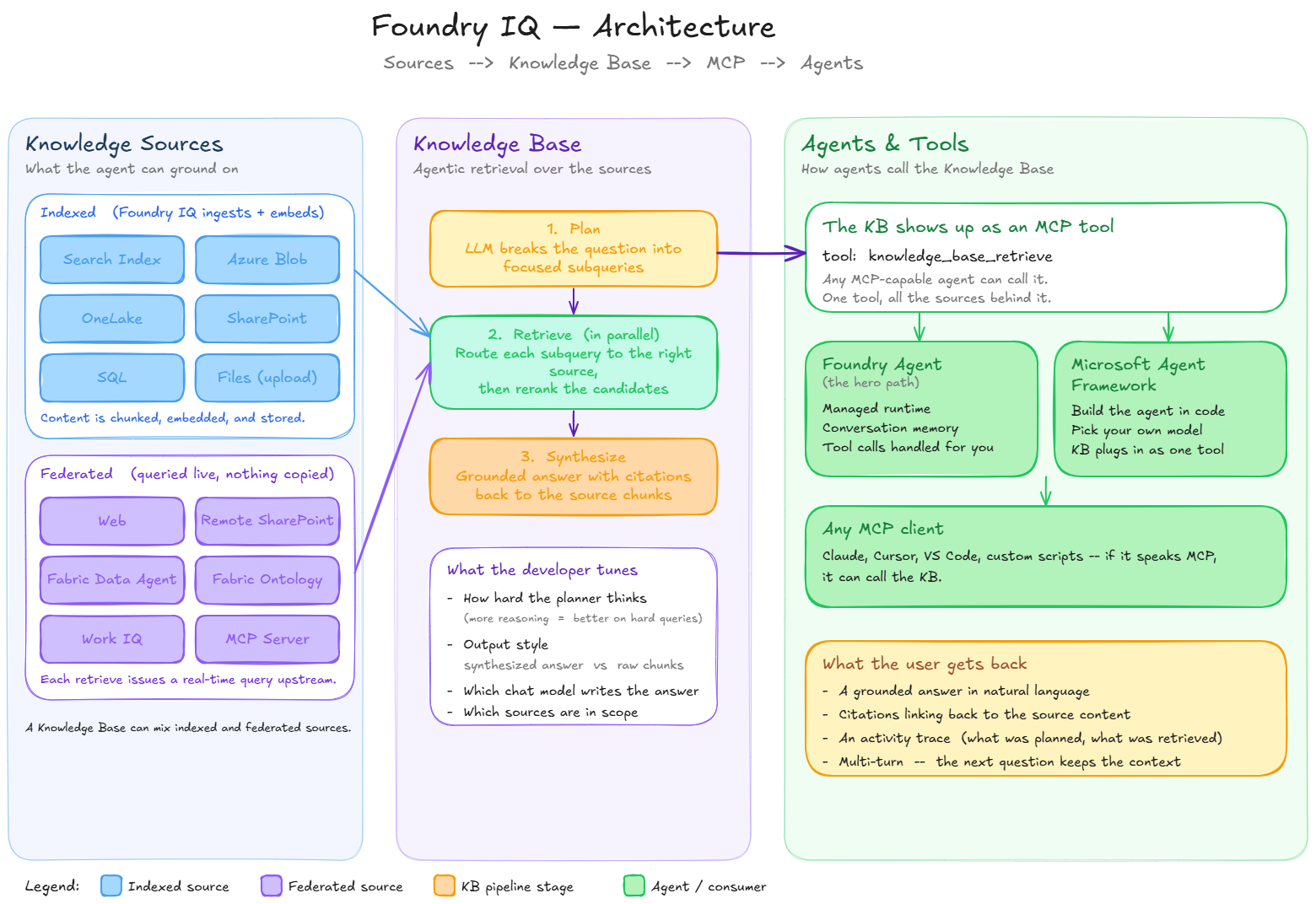
Foundry IQ is Microsoft's intelligence layer for agentic retrieval. A Foundry IQ Knowledge Base (KB) wraps one or more Knowledge Sources (KS) with an LLM that plans subqueries, executes them in parallel, reranks the results, and synthesizes a cited answer.
This recipe focuses on the core primitives: syncing your data into Knowledge Sources, assembling a Knowledge Base, and grounding an agent in that KB — with citations — over the Model Context Protocol (MCP). It uses three representative Knowledge Sources (an indexed source, an uploaded file, and a federated MCP source); the other supported types are summarized in §7.
Production status. Foundry IQ knowledge bases and core knowledge sources (Search Index, Azure Blob, OneLake, Web) are generally available on the stable
2026-04-01REST API — there's a production-endorsed path. This notebook targets the latest2026-05-01-previewto showcase preview-only capabilities: answer synthesis, configurable reasoning effort, document-level permissions, and multi-turn conversational retrieve. See What's new in Azure AI Search and the preview features list for current GA vs. preview status.
Learning goals
By the end you will:
- Sync your data into Foundry IQ Knowledge Sources — bring an existing Search index, upload a file, and federate a live MCP source
- Assemble a Knowledge Base over those sources
- Run a grounded, multi-part query and read its citations + the planner's activity trace
- Continue the conversation multi-turn
- Call the KB directly over MCP (
tools/list+tools/call) - Ground a Foundry Agent in the KB (
RemoteToolconnection + MCP tool + Responses API), preserving citations - (Optional) Plug the same KB into a Microsoft Agent Framework agent
- Tear every resource down
Each Knowledge Source section is independently skippable — set its env vars to enable it, leave them blank to skip cleanly. The KB is assembled from whichever sources were created in this run.
1 · Prerequisites
| Azure AI Search service | Any supported region |
| Microsoft Foundry project | One chat deployment (e.g. gpt-4.1-mini, gpt-5-mini, gpt-4o) + one embedding deployment (e.g. text-embedding-3-large, text-embedding-ada-002) |
Each Knowledge Source section below lists its own resource prerequisites. None of them are required to run this notebook end-to-end — any section whose env vars are blank is skipped cleanly.
Configure your environment
Set the variables below in your shell, or drop them into a local .env file next to this notebook (the repo's .gitignore already excludes .env).
Required:
SEARCH_ENDPOINT=https://<your-search-service>.search.windows.net
SEARCH_API_KEY=<your-search-admin-key>
AOAI_ENDPOINT=https://<your-foundry-resource>.openai.azure.com
AOAI_API_KEY=<your-azure-openai-key>
AOAI_GPT_DEPLOYMENT=gpt-4.1-mini          # or gpt-5-mini, gpt-4o, ...
AOAI_EMBEDDING_DEPLOYMENT=text-embedding-3-large
Optional (each unlocks one Knowledge Source — leave blank to skip): FOUNDRY_PROJECT_ENDPOINT, FOUNDRY_PROJECT_RESOURCE_ID, ZAVA_STORAGE_RID, ZAVA_BLOB_CONTAINER, ZAVA_FILE_UPLOAD_PATH, ZAVA_ONELAKE_*, ZAVA_FABRIC_*, ZAVA_SQL_*, ZAVA_SP_*, ZAVA_MCP_SERVER_*, ZAVA_WORKIQ_USER_TOKEN. See the per-section prereq tables below for exact names.
Install dependencies
Foundry IQ rides on the 2026-05-01-preview Search API, exposed by the public preview azure-search-documents SDK on PyPI. The next cell installs the pinned dependencies in-place; you don't need a separate requirements.txt.
%%capture
# Foundry IQ rides on the public preview azure-search-documents SDK, which
# exposes the 2026-05-01-preview Knowledge Base / Knowledge Source surface.
# azure-ai-projects brings the typed Foundry Agent + MCP tool bindings. Both
# ship on PyPI -- no extra package feed required.
import importlib.metadata as _md

try:
    _ok = _md.version("azure-search-documents").startswith("12.1.0b")
except _md.PackageNotFoundError:
    _ok = False

if not _ok:
    %pip install --quiet \
        "azure-search-documents==12.1.0b1" \
        "azure-ai-projects==2.1.0" \
        "azure-mgmt-cognitiveservices==15.0.0b2" \
        "azure-identity>=1.19.0" \
        "azure-core>=1.32.0" \
        "openai>=1.50.0" \
        "python-dotenv>=1.0.1" \
        "httpx>=0.28.1" \
        "agent-framework-core>=0.1.0" \
        "agent-framework-openai>=0.1.0" \
        "mcp>=1.0.0"
2 · Configure clients + helpers
One SearchIndexClient + one DefaultAzureCredential for Foundry/ARM is
reused throughout. We also define:
env(name, required=False)— env-var lookup with a friendly errorazure_openai_resource_uri()— trims/openai/...pathsks_status(name)—GET /knowledgesources(name)/status, used after every create to confirm the KS isn't stuck oncreatingcreated_ks— a list that every KS section appends to on success; the single Knowledge Base in §8 reads from itcreated_resources— a dict the cleanup section walks in dependency order
import os
from pathlib import Path
from typing import Optional

from azure.core.credentials import AzureKeyCredential
from azure.search.documents import __version__ as search_sdk_version
from azure.search.documents.indexes import SearchIndexClient
from dotenv import load_dotenv

load_dotenv(override=True)


def env(name: str, *, required: bool = True, default: Optional[str] = None) -> Optional[str]:
    value = os.getenv(name, default)
    if required and not value:
        raise RuntimeError(f"Missing required env var: {name}")
    return value or None


def foundry_resource_uri(endpoint: str) -> str:
    # Strip any /openai/... path so we have the bare Foundry resource URI.
    return endpoint.split("/openai/", 1)[0].rstrip("/")


# ---- Required ------------------------------------------------------------
SEARCH_ENDPOINT = env("SEARCH_ENDPOINT")
SEARCH_API_KEY = env("SEARCH_API_KEY")
AOAI_ENDPOINT = foundry_resource_uri(env("AOAI_ENDPOINT"))
AOAI_API_KEY = env("AOAI_API_KEY")

GPT_DEPLOYMENT = env("AOAI_GPT_DEPLOYMENT", required=False, default="gpt-4.1-mini")
GPT_MODEL = env("AOAI_GPT_MODEL", required=False, default=GPT_DEPLOYMENT)
EMBEDDING_DEPLOYMENT = env("AOAI_EMBEDDING_DEPLOYMENT", required=False, default="text-embedding-3-large")
EMBEDDING_MODEL = env("AOAI_EMBEDDING_MODEL", required=False, default=EMBEDDING_DEPLOYMENT)
EMBEDDING_DIMENSIONS = int(env("AOAI_EMBEDDING_DIMENSIONS", required=False, default="3072"))

# ---- Resource names ------------------------------------------------------
INDEX_NAME = "mfiq-earth-at-night"
KB_NAME = "mfiq-master-kb"

credential = AzureKeyCredential(SEARCH_API_KEY)
index_client = SearchIndexClient(endpoint=SEARCH_ENDPOINT, credential=credential)

# ---- Trackers consumed by the KB section and cleanup --------------------
created_ks: list[str] = []
created_resources: dict[str, str] = {}

print(f"azure-search-documents : {search_sdk_version}")
print(f"Search service         : {SEARCH_ENDPOINT}")
print(f"Foundry endpoint       : {AOAI_ENDPOINT}")
print(f"Chat deployment        : {GPT_DEPLOYMENT} ({GPT_MODEL})")
print(f"Embedding deployment   : {EMBEDDING_DEPLOYMENT} ({EMBEDDING_MODEL}, {EMBEDDING_DIMENSIONS} dims)")
The typed SDK wraps every Knowledge Source kind (the three demoed below and the rest in §7). One endpoint isn't
surfaced by the typed SDKs — the direct MCP JSON-RPC route on the Knowledge
Base (§11) — so we call it with httpx (also used to fetch the sample
dataset in §4). The ARM project-connection that wires the KB into a Foundry
agent (§12) now uses the typed azure-mgmt-cognitiveservices SDK. No
requests dependency.
import httpx
from azure.core.exceptions import ResourceNotFoundError
from azure.search.documents.indexes.models import (
AzureOpenAIVectorizerParameters,
KnowledgeBase,
KnowledgeBaseAzureOpenAIModel,
KnowledgeSourceReference,
)
from azure.search.documents.knowledgebases.models import (
KnowledgeSourceAzureOpenAIVectorizer,
KnowledgeSourceIngestionParameters,
)
def aoai_vectorizer_params() -> AzureOpenAIVectorizerParameters:
"""Reused by every indexed Knowledge Source that needs an embedder."""
return AzureOpenAIVectorizerParameters(
resource_url=AOAI_ENDPOINT,
deployment_name=EMBEDDING_DEPLOYMENT,
api_key=AOAI_API_KEY,
model_name=EMBEDDING_MODEL,
)
def ks_embedding_model() -> KnowledgeSourceAzureOpenAIVectorizer:
"""Wraps the embedding params for use inside ingestion parameters."""
return KnowledgeSourceAzureOpenAIVectorizer(
azure_open_ai_parameters=aoai_vectorizer_params()
)
def minimal_ingestion_parameters(*, ingestion_schedule: dict | None = None) -> KnowledgeSourceIngestionParameters:
"""Default ingestion params: minimal content extraction + Foundry embed.
An optional `ingestion_schedule` (e.g. ``{"interval": "P1D", "startTime": "..."}``)
is forwarded to the SDK to drive the generated indexer on a cadence.
"""
kwargs: dict = {
"content_extraction_mode": "minimal",
"embedding_model": ks_embedding_model(),
}
if ingestion_schedule is not None:
kwargs["ingestion_schedule"] = ingestion_schedule
return KnowledgeSourceIngestionParameters(**kwargs)
def summarize_ks(name: str) -> None:
"""Print the SDK status of a Knowledge Source after create."""
try:
status = index_client.get_knowledge_source_status(name)
except Exception as exc: # pragma: no cover - best-effort summary
print(f" status: <unavailable: {exc.__class__.__name__}>")
return
sync = getattr(status, "synchronization_status", None) or "?"
last_state = getattr(status, "last_synchronization_state", None)
last = getattr(last_state, "status", None) if last_state else "n/a"
stats = getattr(status, "statistics", None) or {}
print(f" synchronizationStatus={sync} lastSync={last} stats={stats}")
def wait_for_ks_active(name: str, *, timeout: int = 300, poll: int = 10) -> None:
"""Block until an ingesting Knowledge Source finishes (status -> active).
File / Blob / OneLake sources embed asynchronously after creation. Querying
a Knowledge Base before its sources are active raises a validation error, so
we poll until the source reports ``active`` (or the timeout elapses).
"""
import time
deadline = time.monotonic() + timeout
while True:
try:
state = (getattr(index_client.get_knowledge_source_status(name),
"synchronization_status", "") or "").lower()
except Exception:
state = ""
if state == "active":
print(f" {name} is active.")
return
if time.monotonic() >= deadline:
print(f" {name} still '{state or '?'}' after {timeout}s -- proceeding anyway.")
return
print(f" waiting for {name} to finish ingesting (status={state or '?'})...")
time.sleep(poll)
def skip(section: str, reason: str) -> None:
print(f"[skipped] {section}: {reason}")
# Shared httpx client for the one endpoint the typed SDKs don't expose -- the
# direct MCP JSON-RPC route on the KB (§11) -- plus the sample-data fetch (§4).
http = httpx.Client(timeout=httpx.Timeout(180.0, connect=30.0))
3 · Provision the backing Search index
The Search Index KS in §4 needs an existing index to point at. We declare a tiny but production-shaped index with three configurations:
- A vector field sized for whatever embedding model you configured (1536
for
text-embedding-ada-002, 3072 fortext-embedding-3-large). - An HNSW vector profile plus an
AzureOpenAIVectorizerso the service embeds query strings on the fly — you never have to embed at query time. - A semantic configuration — required for agentic retrieval; the KB's planner uses the semantic ranker to rerank candidates before synthesis.
This is intentionally minimal so the rest of the notebook has data to ground against. For production index design, see Create a vector index.
from azure.search.documents.indexes.models import (
    AzureOpenAIVectorizer,
    HnswAlgorithmConfiguration,
    SearchField,
    SearchFieldDataType,
    SearchIndex,
    SemanticConfiguration,
    SemanticField,
    SemanticPrioritizedFields,
    SemanticSearch,
    SimpleField,
    VectorSearch,
    VectorSearchProfile,
)

fields = [
    SimpleField(name="id", type=SearchFieldDataType.String, key=True, filterable=True, sortable=True, facetable=True),
    SearchField(name="page_chunk", type=SearchFieldDataType.String),
    SearchField(
        name="page_embedding",
        type=SearchFieldDataType.Collection(SearchFieldDataType.Single),
        vector_search_dimensions=EMBEDDING_DIMENSIONS,
        vector_search_profile_name="hnsw_profile",
    ),
    SimpleField(name="page_number", type=SearchFieldDataType.Int32, filterable=True, sortable=True, facetable=True),
]

vector_search = VectorSearch(
    profiles=[
        VectorSearchProfile(name="hnsw_profile", algorithm_configuration_name="alg", vectorizer_name="aoai_vec")
    ],
    algorithms=[HnswAlgorithmConfiguration(name="alg")],
    vectorizers=[AzureOpenAIVectorizer(vectorizer_name="aoai_vec", parameters=aoai_vectorizer_params())],
)

semantic_search = SemanticSearch(
    default_configuration_name="semantic_config",
    configurations=[
        SemanticConfiguration(
            name="semantic_config",
            prioritized_fields=SemanticPrioritizedFields(content_fields=[SemanticField(field_name="page_chunk")]),
        )
    ],
)

index_client.create_or_update_index(
    SearchIndex(
        name=INDEX_NAME,
        fields=fields,
        vector_search=vector_search,
        semantic_search=semantic_search,
    )
)
created_resources["index"] = INDEX_NAME
print(f"Index '{INDEX_NAME}' is ready ({EMBEDDING_DIMENSIONS}-dim vector field).")
Load the NASA Earth at Night dataset. Each row is a pre-chunked page
with an embedding already attached. If your embedding deployment is
text-embedding-3-large (3072 dims) the file works as-is; for any other
model we re-embed each chunk using the deployment configured in §2,
so the dimensions match what the index expects.
from azure.search.documents import SearchIndexingBufferedSender
from openai import AzureOpenAI

DATA_URL = (
    "https://raw.githubusercontent.com/Azure-Samples/azure-search-sample-data"
    "/refs/heads/main/nasa-e-book/earth-at-night-json/documents.json"
)
raw_docs = http.get(DATA_URL).json()

# Re-embed only if the pre-computed 3072-dim vectors don't match this index.
needs_reembed = EMBEDDING_DIMENSIONS != 3072
if needs_reembed:
    print(f"Re-embedding {len(raw_docs)} chunks with {EMBEDDING_DEPLOYMENT} ({EMBEDDING_DIMENSIONS} dims)...")
    oai = AzureOpenAI(api_key=AOAI_API_KEY, azure_endpoint=AOAI_ENDPOINT, api_version="2024-10-21")
    batch_size = 16
    for start in range(0, len(raw_docs), batch_size):
        batch = raw_docs[start : start + batch_size]
        resp = oai.embeddings.create(model=EMBEDDING_DEPLOYMENT, input=[d["page_chunk"] for d in batch])
        for doc, item in zip(batch, resp.data):
            doc["page_embedding"] = item.embedding
            doc.pop("page_embedding_text_3_large", None)
else:
    for d in raw_docs:
        d["page_embedding"] = d.pop("page_embedding_text_3_large")

with SearchIndexingBufferedSender(
    endpoint=SEARCH_ENDPOINT, index_name=INDEX_NAME, credential=credential
) as sender:
    sender.upload_documents(documents=raw_docs)

print(f"Uploaded {len(raw_docs)} documents to '{INDEX_NAME}'.")
4 · Search Index Knowledge Source
kind |
searchIndex |
| Auth model | Same-service — Search admin api-key only. |
| Pipeline | None — points at an existing index. Most flexible; you keep full control of the schema, vectorizer, and skillset. |
| Env vars | (none) |
Prereqs: the index from §3 (already created above).
Known issues / gotchas: baseFilter on the KS narrows the queryable subset for the KB; semantics differ from per-call filterAddOn. Use alwaysQuerySource=true at retrieve time to bypass the planner's relevance heuristic.
from azure.search.documents.indexes.models import (
    SearchIndexKnowledgeSource,
    SearchIndexKnowledgeSourceParameters,
)

KS_SEARCH_INDEX = "mfiq-ks-search-index"

ks = SearchIndexKnowledgeSource(
    name=KS_SEARCH_INDEX,
    description="Search Index KS over the NASA Earth at Night sample.",
    search_index_parameters=SearchIndexKnowledgeSourceParameters(
        search_index_name=INDEX_NAME,
        semantic_configuration_name="semantic_config",
        source_data_fields=[{"name": "id"}, {"name": "page_chunk"}, {"name": "page_number"}],
    ),
)
index_client.create_or_update_knowledge_source(ks)
created_ks.append(KS_SEARCH_INDEX)
print(f"Created {KS_SEARCH_INDEX}")
summarize_ks(KS_SEARCH_INDEX)
5 · File Knowledge Source
kind |
file |
| Auth model | Search admin api-key. Files upload directly into the KS — no separate data source or storage account. |
| Pipeline | Per-file ingestion. Files are POSTed individually after KS create. |
| Env vars | ZAVA_FILE_UPLOAD_PATH |
Prereqs: any local file (PDF, DOCX, HTML, TXT, etc.).
Known issues / gotchas: Upload uses the non-OData route POST /knowledgesources/{name}/files (no quotes/parens, no ('...')) with Content-Type: application/octet-stream. The OData form is fronted by a JSON-only middleware that rejects binary bodies.
from azure.search.documents.indexes.models import (
    FileKnowledgeSource,
    FileKnowledgeSourceParameters,
)

KS_FILE = "mfiq-ks-file"

DEFAULT_ZAVA_PATH = Path("data/mastering-foundry-iq/Zava-Corporate-Presentation.pdf")
file_path_str = env("ZAVA_FILE_UPLOAD_PATH", required=False, default=str(DEFAULT_ZAVA_PATH))
file_path = Path(file_path_str).expanduser()
if not file_path.is_absolute():
    file_path = (Path.cwd() / file_path).resolve()

if not file_path.is_file():
    skip(
        KS_FILE,
        f"set ZAVA_FILE_UPLOAD_PATH or drop the Zava PDF at {file_path} (got: {file_path_str!r})",
    )
else:
    # 1) Create the File KS with the typed SDK model.
    ks = FileKnowledgeSource(
        name=KS_FILE,
        description=f"File KS holding uploaded copies of {file_path.name}.",
        file_parameters=FileKnowledgeSourceParameters(
            ingestion_parameters=minimal_ingestion_parameters(),
        ),
    )
    index_client.create_or_update_knowledge_source(ks)
    print(f"Created {KS_FILE}")

    # 2) Upload via the SDK (upload_knowledge_source_file).
    #    Retry with backoff: file upload triggers a synchronous embed pass,
    #    which on shared embedding deployments can transiently 429.
    import time as _time
    max_attempts = 5
    for attempt in range(1, max_attempts + 1):
        try:
            with file_path.open("rb") as fh:
                uploaded = index_client.upload_knowledge_source_file(KS_FILE, fh.read(), filename=file_path.name)
            break
        except Exception as exc:
            msg = str(exc)
            if "429" in msg and attempt < max_attempts:
                wait = 2 ** attempt
                print(f"  upload attempt {attempt} got 429 -- backing off {wait}s")
                _time.sleep(wait)
                continue
            raise
    print(f"Uploaded {file_path.name} ({uploaded.file_size_bytes:,} bytes) "
          f"as file_id={uploaded.file_id} in {attempt} attempt(s)")

    # 3) List + verify (showcases list_knowledge_source_files).
    files = list(index_client.list_knowledge_source_files(KS_FILE))
    print(f"KS now holds {len(files)} file(s):")
    for f in files:
        print(f"  - {f.file_id}  {getattr(f, 'file_size_bytes', '?')} bytes")

    created_ks.append(KS_FILE)
    summarize_ks(KS_FILE)
    wait_for_ks_active(KS_FILE)
6 · MCP Server Knowledge Source
kind |
mcpServer |
| Auth model | Either none (public MCP servers like Microsoft Learn) or via a Foundry CustomKeys connection (for servers that need an API key, e.g. Speedbird). |
| Pipeline | Federated — every retrieve does tools/call on the upstream MCP server. |
| Env vars | ZAVA_MCP_SERVER_URL (optional override), ZAVA_MCP_SERVER_API_KEY (optional — only if your server requires a key) |
Prereqs: the upstream MCP server URL + tool names it publishes.
Known issues / gotchas: tools[].name MUST match a tool the upstream server actually publishes. For outputParsing.kind = 'auto' Foundry IQ infers; use 'text' or 'structured' if auto fails.
from azure.search.documents.indexes.models import (
    McpServerKnowledgeSource,
    McpServerKnowledgeSourceParameters,
)

KS_MCP = "mfiq-ks-mcp-learn"

# Default to the always-public Microsoft Learn MCP server.
server_url = env("ZAVA_MCP_SERVER_URL", required=False, default="https://learn.microsoft.com/api/mcp")
learn_default = "learn.microsoft.com" in server_url

ks = McpServerKnowledgeSource(
    name=KS_MCP,
    description="MCP Server KS -- Microsoft Learn (no auth required).",
    mcp_server_parameters=McpServerKnowledgeSourceParameters(
        server_url=server_url,
        tools=[
            {
                "name": "microsoft_docs_search" if learn_default else "web",
                "outputParsing": {"kind": "auto"},
                "inclusionMode": "reranked",
                "maxOutputTokens": 4096,
            }
        ],
    ),
)
# For servers that need an API key, the canonical pattern is a Foundry
# CustomKeys connection; we keep this section self-contained on the public
# Learn endpoint.
try:
    index_client.create_or_update_knowledge_source(ks)
    created_ks.append(KS_MCP)
    print(f"Created {KS_MCP} ({server_url})")
    summarize_ks(KS_MCP)
except Exception as exc:
    skip(KS_MCP, f"create failed: {exc}")
7 · Other supported Knowledge Sources
Sections 4–6 showed the three archetypes — indexed, uploaded, and federated.
Foundry IQ supports more source types; each is created with the same
create_or_update_knowledge_source call, swapping in the typed model below. See
What's new and the
preview features list
for current GA vs. preview status.
| Knowledge Source | SDK model | Status | Docs |
|---|---|---|---|
| Azure Blob | AzureBlobKnowledgeSource |
GA | Blob |
| Indexed OneLake | IndexedOneLakeKnowledgeSource |
GA | OneLake |
| Web | WebKnowledgeSource |
GA | Web |
| Indexed SharePoint | IndexedSharePointKnowledgeSource |
Preview | SharePoint (indexed) |
| Remote SharePoint | RemoteSharePointKnowledgeSource |
Preview | SharePoint (remote) |
| Indexed SQL | IndexedSqlKnowledgeSource |
Preview | Knowledge sources |
| Fabric Data Agent | FabricDataAgentKnowledgeSource |
Preview | Knowledge sources |
| Fabric Ontology | FabricOntologyKnowledgeSource |
Preview | Knowledge sources |
| WorkIQ | WorkIQKnowledgeSource |
Preview | Knowledge sources |
Indexed sources (Blob, OneLake, SharePoint Indexed, SQL) build an indexer + skillset for you — Foundry IQ chunks, embeds, and indexes the content. Federated sources (Web, Remote SharePoint, MCP Server) query the upstream system live at retrieve time.
8 · The Knowledge Base — three heterogeneous Knowledge Sources
The KB is the singleton consumer of the KS layer. We assemble one KB over the three sources created above — deliberately diverse so you can see the KB fan out across different retrieval shapes:
| KS in the demo KB | Archetype |
|---|---|
mfiq-ks-search-index |
Indexed — an existing Azure AI Search index you fully control. |
mfiq-ks-file |
Uploaded — a file ingested directly by Foundry IQ (no storage account, indexer, or skillset). |
mfiq-ks-mcp-learn |
Federated — every retrieve calls a live external MCP server (Microsoft Learn). |
The KB carries:
| Setting | What it controls |
|---|---|
models |
Chat model used for query planning + answer synthesis |
knowledgeSources |
Which sources are in scope |
retrievalReasoningEffort |
minimal / low / medium — how hard the planner thinks |
outputMode |
extractiveData (raw chunks) or answerSynthesis (cited NL answer) |
answerInstructions |
System prompt that shapes the synthesized answer |
We pick answerSynthesis + low as the production-friendly default. A
KB can reference up to the current preview limit of sources — mix any of the
types from §7 in your own KBs.
if not created_ks:
    raise RuntimeError("No Knowledge Sources were created -- cannot build a KB. Configure at least one KS env block.")

# For the demo KB pick a SMALL, DIVERSE subset (the current preview caps at
# 10 KS per KB, but readability matters more). Three is enough to show
# heterogeneity: one canonical index-backed source, one direct-upload Zava
# PDF source, and one federated MCP source.
HERO_KS = [
    "mfiq-ks-search-index",
    "mfiq-ks-file",
    "mfiq-ks-mcp-learn",
]
kb_sources = [n for n in HERO_KS if n in created_ks]
if not kb_sources:
    kb_sources = created_ks[:1]

print(f"Building KB '{KB_NAME}' referencing {len(kb_sources)} knowledge source(s):")
for n in kb_sources:
    print(f"  - {n}")
skipped_extras = [n for n in created_ks if n not in kb_sources]
if skipped_extras:
    print("\n(The following KS were created but not added to this demo KB -- they're available for your own KBs:)")
    for n in skipped_extras:
        print(f"  - {n}")

from azure.search.documents.knowledgebases.models import (
    KnowledgeRetrievalLowReasoningEffort,
    KnowledgeRetrievalOutputMode,
)

gpt_params = AzureOpenAIVectorizerParameters(
    resource_url=AOAI_ENDPOINT,
    deployment_name=GPT_DEPLOYMENT,
    api_key=AOAI_API_KEY,
    model_name=GPT_MODEL,
)

kb = KnowledgeBase(
    name=KB_NAME,
    description="Master KB fanning out to a curated, heterogeneous mix of KS configured in this notebook run.",
    models=[KnowledgeBaseAzureOpenAIModel(azure_open_ai_parameters=gpt_params)],
    knowledge_sources=[KnowledgeSourceReference(name=n) for n in kb_sources],
    retrieval_reasoning_effort=KnowledgeRetrievalLowReasoningEffort(),
    output_mode=KnowledgeRetrievalOutputMode.ANSWER_SYNTHESIS,
    answer_instructions=(
        "Provide a concise, faithful answer using only the retrieved content. "
        "Preserve [ref_id:N] citations the planner returns."
    ),
)
index_client.create_or_update_knowledge_base(kb)
created_resources["kb"] = KB_NAME
print(f"\nKnowledge Base '{KB_NAME}' is ready.")
9 · Hero query — multi-source, multi-part question
This is where agentic retrieval earns its keep. The query below bundles three different concerns in one turn — exactly the case where naive single-vector RAG falls apart, because no one source knows the answer.
The KB will:
- Plan — the LLM decomposes the user turn into focused subqueries
- Retrieve — each subquery is routed to the right KS in parallel (Earth-at-Night chunks for auroras, the uploaded Zava PDF for the corporate description, Microsoft Learn over MCP for agentic retrieval), and the semantic ranker reorders candidates
- Synthesize — the LLM writes one grounded answer with
[ref_id:N]citations that span all three sources
alwaysQuerySource=True forces the planner to actually query each source
instead of short-circuiting. includeActivity=True exposes every step.
from azure.search.documents.knowledgebases import KnowledgeBaseRetrievalClient
from azure.search.documents.knowledgebases.models import (
    FileKnowledgeSourceParams,
    KnowledgeBaseMessage,
    KnowledgeBaseMessageTextContent,
    KnowledgeBaseRetrievalRequest,
    McpServerKnowledgeSourceParams,
    SearchIndexKnowledgeSourceParams,
)

retrieval_client = KnowledgeBaseRetrievalClient(
    endpoint=SEARCH_ENDPOINT,
    credential=credential,
    knowledge_base_name=KB_NAME,
)


def ks_params_for(name: str):
    """Per-kind retrieve params for the KS we wired into the hero KB."""
    if name == "mfiq-ks-search-index":
        return SearchIndexKnowledgeSourceParams(
            knowledge_source_name=name,
            include_references=True,
            include_reference_source_data=True,
            always_query_source=True,
            max_output_documents=50,
            fail_on_error=False,
            reranker_threshold=0.0,
        )
    if name == "mfiq-ks-file":
        return FileKnowledgeSourceParams(
            knowledge_source_name=name,
            include_references=True,
            include_reference_source_data=True,
            always_query_source=True,
        )
    if name == "mfiq-ks-mcp-learn":
        return McpServerKnowledgeSourceParams(
            knowledge_source_name=name,
            include_references=True,
        )
    return None


def retrieve(messages: list[dict], max_runtime_seconds: int = 180):
    request = KnowledgeBaseRetrievalRequest(
        messages=[
            KnowledgeBaseMessage(
                role=m["role"],
                content=[KnowledgeBaseMessageTextContent(text=m["content"])],
            )
            for m in messages
        ],
        knowledge_source_params=[p for p in (ks_params_for(n) for n in kb_sources) if p],
        include_activity=True,
        max_runtime_in_seconds=max_runtime_seconds,
    )
    return retrieval_client.retrieve(request)


def answer_text(result) -> str:
    parts = []
    for message in (result.response or []):
        for content in (message.content or []):
            text = getattr(content, "text", None)
            if text:
                parts.append(text)
    return "\n\n".join(parts)


messages = [
    {
        "role": "user",
        "content": (
            "Compare how the NASA Earth at Night dataset describes auroras versus "
            "how the Zava corporate presentation describes Zava's business. "
            "Then, separately, what does the Microsoft Learn documentation say "
            "about agentic retrieval in Azure AI Search?"
        ),
    }
]
result = retrieve(messages)
first_answer = answer_text(result)

print("ANSWER")
print("------")
print(first_answer)
print()
print(f"Activity steps : {len(result.activity or [])}")
print(f"References     : {len(result.references or [])}")
9a · Inspect the planner activity trace
import json as _json
activity_dicts = [a.as_dict() if hasattr(a, "as_dict") else dict(a) for a in (result.activity or [])]
print(_json.dumps(activity_dicts, indent=2)[:3500])
9b · Inspect the first few references (the citations that ground the answer)
for ref in (result.references or [])[:3]:
    src = ref.source_data or {}
    page_no = src.get("page_number") if isinstance(src, dict) else getattr(src, "page_number", None)
    chunk = (src.get("page_chunk") if isinstance(src, dict) else getattr(src, "page_chunk", None)) or ""
    snippet = chunk[:240].replace("\n", " ")
    print(f"[ref_id:{ref.id}] doc_key={getattr(ref, 'doc_key', None)!r}  page={page_no}")
    if snippet:
        print(f"  {snippet}{'...' if len(snippet) == 240 else ''}")
    print()
10 · Continue the conversation (multi-turn)
Agentic retrieval is conversation-aware. We append the prior answer and ask a narrower question — the planner uses the earlier context when deciding what to retrieve next.
messages.append({"role": "assistant", "content": first_answer})
messages.append({"role": "user", "content": "Looking at the auroras described in those references, what causes the different colors observed at different altitudes?"})

result2 = retrieve(messages)
print("FOLLOW-UP ANSWER")
print("----------------")
print(answer_text(result2))
print()
print(f"Activity steps : {len(result2.activity or [])}")
print(f"References     : {len(result2.references or [])}")
11 · Talk to the Knowledge Base directly over MCP
Every Foundry IQ KB exposes itself as a Model Context Protocol server at:
{SEARCH_ENDPOINT}/knowledgebases/{KB_NAME}/mcp?api-version=2026-05-01-preview
Any MCP-capable client — Claude Desktop, VS Code Copilot, the Foundry Agent
Service, the Microsoft Agent Framework, a custom Python script — can call
the same retrieval pipeline using one tool: knowledge_base_retrieve.
The transport is plain JSON-RPC 2.0 over HTTP with either JSON or
SSE-streamable responses. Auth is the same Search admin api-key. For
federated KS that need user identity (Remote SharePoint, WorkIQ), you
also pass x-ms-query-source-authorization: <user OBO token>.
import json as _json

KB_MCP_API_VERSION = "2026-05-01-preview"
MCP_URL = f"{SEARCH_ENDPOINT}/knowledgebases/{KB_NAME}/mcp?api-version={KB_MCP_API_VERSION}"
MCP_HEADERS = {
    "api-key": SEARCH_API_KEY,
    "Content-Type": "application/json",
    "Accept": "application/json, text/event-stream",
}


def _parse_mcp(response: httpx.Response) -> dict:
    ct = response.headers.get("Content-Type", "")
    if "text/event-stream" in ct:
        for line in response.text.splitlines():
            if line.startswith("data: "):
                return _json.loads(line[len("data: "):])
        raise RuntimeError(f"No data event in SSE response: {response.text[:200]}")
    return response.json()


# tools/list -- discover the surface this KB publishes.
list_resp = http.post(MCP_URL, headers=MCP_HEADERS,
    json={"jsonrpc": "2.0", "id": 1, "method": "tools/list"})
list_resp.raise_for_status()
tools_payload = _parse_mcp(list_resp)
print("Tools published by this KB")
print("--------------------------")
for t in tools_payload["result"]["tools"]:
    first_line = (t.get("description", "") or "").splitlines()[0]
    print(f"- {t['name']}: {first_line[:140]}")
print()

# tools/call -- same retrieval, JSON-RPC envelope.
call_resp = http.post(MCP_URL, headers=MCP_HEADERS, json={
    "jsonrpc": "2.0", "id": 2,
    "method": "tools/call",
    "params": {
        "name": "knowledge_base_retrieve",
        "arguments": {"queries": ["What does the dataset show about wildfires visible at night?"]},
    },
})
call_resp.raise_for_status()
call_payload = _parse_mcp(call_resp)

print("knowledge_base_retrieve (over MCP)")
print("----------------------------------")
for block in call_payload["result"].get("content", []):
    if block.get("type") == "text":
        print(block["text"])
12 · Ground a Foundry Agent in the Knowledge Base
The Foundry Agent Service hosts the agent loop, the conversation store, and the MCP runtime for you. To attach a Foundry IQ KB:
- Create a
RemoteToolproject connection pointing at the KB's MCP URL with the typedazure-mgmt-cognitiveservicesmanagement SDK.authType=ProjectManagedIdentitylets the project assume its own identity when calling Search — no per-user tokens stored on the connection. - Create an agent that declares an
mcptool referencing the connection and allow-listsknowledge_base_retrieve. - Create a conversation, then POST to
/openai/v1/responseswith the agent reference and user input. The Responses API runs the chain and returns a grounded answer.
Auth:
DefaultAzureCredential. Runaz loginfirst. Roles needed: Cognitive Services Contributor (agent), Azure AI User (project endpoint), and write access on the project's resource group (connection create).
Skip: if
FOUNDRY_PROJECT_ENDPOINTis blank, this cell prints a skip message and the rest of the notebook still runs.
import re
from azure.identity import DefaultAzureCredential
from azure.ai.projects import AIProjectClient
from azure.ai.projects.models import MCPTool, PromptAgentDefinition
from azure.mgmt.cognitiveservices import CognitiveServicesManagementClient
from azure.mgmt.cognitiveservices.models import (
    ConnectionPropertiesV2,
    ConnectionPropertiesV2BasicResource,
)

project_endpoint = env("FOUNDRY_PROJECT_ENDPOINT", required=False)
project_rid = env("FOUNDRY_PROJECT_RESOURCE_ID", required=False)
agent_name = "mfiq-cookbook-agent"
connection_name = "mfiq-cookbook-connection"

if not (project_endpoint and project_rid):
    skip("Foundry Agent", "set FOUNDRY_PROJECT_ENDPOINT and FOUNDRY_PROJECT_RESOURCE_ID to enable")
else:
    credential_aad = DefaultAzureCredential()

    # 1) Create the RemoteTool project connection that targets the KB MCP
    #    endpoint, using the typed azure-mgmt-cognitiveservices management SDK.
    #    Parse the project's ARM id for the subscription, resource group,
    #    Foundry account, and project names the SDK addresses by.
    rid = re.search(
        r"/subscriptions/(?P<sub>[^/]+)/resourceGroups/(?P<rg>[^/]+)/providers/"
        r"Microsoft\.CognitiveServices/accounts/(?P<account>[^/]+)/projects/(?P<project>[^/]+)",
        project_rid, re.IGNORECASE,
    )
    if not rid:
        raise ValueError(
            "FOUNDRY_PROJECT_RESOURCE_ID must be a Microsoft.CognitiveServices "
            "account/project ARM id (.../accounts/<account>/projects/<project>)."
        )
    conn_ref = {**rid.groupdict(), "connection": connection_name}
    cogsvc_client = CognitiveServicesManagementClient(credential_aad, conn_ref["sub"])

    conn_props = ConnectionPropertiesV2(
        auth_type="ProjectManagedIdentity",
        category="RemoteTool",
        target=MCP_URL,
        is_shared_to_all=True,
        metadata={"ApiType": "Azure"},
    )
    conn_props["audience"] = "https://search.azure.com/"  # token audience for Search
    cogsvc_client.project_connections.create(
        resource_group_name=conn_ref["rg"],
        account_name=conn_ref["account"],
        project_name=conn_ref["project"],
        connection_name=connection_name,
        connection=ConnectionPropertiesV2BasicResource(properties=conn_props),
    )
    created_resources["foundry_connection"] = conn_ref
    print(f"Project connection ready: {connection_name}")

    # 2) Create the Foundry Agent with the typed azure-ai-projects 2.1.0 SDK.
    project_client = AIProjectClient(endpoint=project_endpoint, credential=credential_aad)

    mcp_kb_tool = MCPTool(
        server_label="knowledge-base",
        server_url=MCP_URL,
        require_approval="never",
        allowed_tools=["knowledge_base_retrieve"],
        project_connection_id=connection_name,
    )
    agent_def = PromptAgentDefinition(
        model=GPT_DEPLOYMENT,
        instructions=(
            "Always call knowledge_base_retrieve before answering. "
            "Preserve [ref_id:N] citations the tool returns. "
            "If a question spans multiple sources, integrate them faithfully."
        ),
        tools=[mcp_kb_tool],
    )
    agent_version = project_client.agents.create_version(
        agent_name=agent_name,
        definition=agent_def,
    )
    created_resources["foundry_agent"] = agent_name
    print(f"Agent ready: {agent_name} (version {getattr(agent_version, 'version', '?')})")

    # 3) Run a conversation through the Responses API.
    openai_client = project_client.get_openai_client()
    conversation = openai_client.conversations.create()
    response = openai_client.responses.create(
        conversation=conversation.id,
        input="How are city lights used to track urbanization patterns over time?",
        extra_body={"agent_reference": {"name": agent_name, "type": "agent_reference"}},
    )

    print("\nFoundry agent answer")
    print("--------------------")
    print(getattr(response, "output_text", None) or "(no output_text)")
13 · Microsoft Agent Framework (optional)
The Microsoft Agent Framework ships first-class MCP transports. To plug the same KB in:
| Piece | What it does |
|---|---|
MCPStreamableHTTPTool |
Connects to the KB MCP endpoint and surfaces knowledge_base_retrieve as a tool. |
OpenAIChatClient (Azure mode) |
Drives the Azure OpenAI Responses API. |
Agent |
The minimal runtime — receives the user message, lets the model decide when to call the tool, returns the final answer. |
Two gotchas worth remembering:
- The KB MCP server is stateless — pass
load_prompts=Falseso the framework doesn't try to call the unsupportedprompts/list. - The api-key (or
x-ms-query-source-authorizationfor federated KS) must be attached at the HTTP layer. Build anhttpx.AsyncClient(headers=...)and pass it in viahttp_client=.
import warnings, asyncio
warnings.filterwarnings("ignore", message=".*is experimental.*")

import httpx as _httpx
from agent_framework import Agent, MCPStreamableHTTPTool
from agent_framework_openai import OpenAIChatClient


async def run_maf() -> str:
    mcp_http = _httpx.AsyncClient(
        headers={"api-key": SEARCH_API_KEY, "Accept": "application/json, text/event-stream"},
        timeout=_httpx.Timeout(120.0, connect=30.0),
    )
    try:
        async with MCPStreamableHTTPTool(
            name="foundry_iq_kb",
            url=MCP_URL,
            http_client=mcp_http,
            allowed_tools=["knowledge_base_retrieve"],
            approval_mode="never_require",
            load_prompts=False,
        ) as kb_tool:
            chat_client = OpenAIChatClient(
                azure_endpoint=AOAI_ENDPOINT,
                api_key=AOAI_API_KEY,
                api_version="preview",
                model=GPT_DEPLOYMENT,
            )
            agent = Agent(
                client=chat_client,
                name="MasteringFoundryIqAgent",
                instructions=(
                    "You are a grounded research assistant. For every user question, "
                    "call foundry_iq_kb-knowledge_base_retrieve first and answer only "
                    "with information returned by the tool. Always preserve the "
                    "[ref_id:N] citations the tool returns."
                ),
                tools=kb_tool,
            )
            response = await agent.run(
                "What patterns of light do auroras create when observed from orbit at night?"
            )
            return response.text
    finally:
        await mcp_http.aclose()


maf_answer = await run_maf()
print("Microsoft Agent Framework answer")
print("--------------------------------")
print(maf_answer)
14 · Clean up
The KB, every KS, the sample index, the Foundry agent, and the Foundry project connection are all chargeable. We delete them in dependency order so a re-run starts from a blank slate.
Comment this cell out if you want to keep the KB for further experimentation.
# 1) Delete the Foundry agent + project connection (best-effort, typed SDKs).
if created_resources.get("foundry_agent"):
    try:
        project_client.agents.delete(created_resources["foundry_agent"])
        print(f"Deleted Foundry agent: {created_resources['foundry_agent']}")
    except Exception as exc:
        print(f"Foundry agent delete: {exc}")
    try:
        ref = created_resources.get("foundry_connection")
        if ref:
            CognitiveServicesManagementClient(
                DefaultAzureCredential(), ref["sub"]
            ).project_connections.delete(
                resource_group_name=ref["rg"],
                account_name=ref["account"],
                project_name=ref["project"],
                connection_name=ref["connection"],
            )
            print("Deleted Foundry project connection.")
    except Exception as exc:
        print(f"Foundry connection delete: {exc}")

# 2) Delete the KB.
if created_resources.get("kb"):
    try:
        index_client.delete_knowledge_base(created_resources["kb"])
        print(f"Deleted KB {created_resources['kb']}")
    except ResourceNotFoundError:
        pass

# 3) Delete every KS we created.
for ks in created_ks:
    try:
        index_client.delete_knowledge_source(ks)
        print(f"Deleted KS {ks}")
    except ResourceNotFoundError:
        pass

# 4) Delete the sample index.
if created_resources.get("index"):
    try:
        index_client.delete_index(created_resources["index"])
        print(f"Deleted index {created_resources['index']}")
    except Exception as exc:
        print(f"Index delete: {exc}")

# 5) Close the shared httpx client.
try:
    http.close()
except Exception:
    pass
15 · Next steps
You now have the full Index → KS (× many) → KB → Agent pipeline working with agentic retrieval, multi-turn context, answer synthesis, and both Foundry Agent + Microsoft Agent Framework consumers. From here:
- Productionize Foundry Agent auth — Step 21 used
ProjectManagedIdentity. For federated KS (Remote SharePoint, WorkIQ) wire per-user OBO by passingx-ms-query-source-authorizationviastructured_inputs. See: Connect a knowledge base to a Foundry agent. - Add Purview and ACL trim to your indexed KS that support full ACLs
(ADLS Gen2, SharePoint) by setting
ingestionPermissionOptions=["sensitivityLabel", "groupIds", "userIds"]. - Add Purview sensitivity-label support to your indexed KS that support
labels only (Blob, OneLake) by setting
ingestionPermissionOptions=["sensitivityLabel"]. In both cases, pass the same OBO header at retrieve time. - Move to Managed Identity end-to-end — swap
AzureKeyCredentialforDefaultAzureCredentialand assign Search Service Contributor, Search Index Data Contributor, Cognitive Services User.